Using Script Preview Mode
A preview runs a script full screen, without the editor around it. Share one with people who do not know the editors, embed one in your website, or check how your script looks to a visitor.
A preview runs the script as soon as it opens. Two things are worth knowing:
- Long computations. If your script takes long to compute, show something meanwhile, such as a loading message drawn in the scene, or visitors may think it is broken.
- Memory. A heavy scene can be too much for a phone. Try the preview on the devices you share it to.
A Designer script's preview shows its design instead of running code: the model to turn and inspect, its configurations to choose from, and Open on bitbybit.dev. It is view only for everyone, Gold members included, and it always loads the Bitbybit OCCT Kernel the Designer builds with, so sharing it offers no kernel choice.
Open a preview
- Someone else's public script: on its project's page among the public projects, choose Open in Preview beside the script. Search results offer a preview too.
- Your own script: in My Projects, the icon Open the preview in a new tab beside a cloud script opens it.
A preview's address is the script's address with /preview in place of the editor:
- Editor:
https://bitbybit.dev/app/matas/5ZiDeL9V4tKAL7WADhXJ/QeNwwFOcSZd8ivftxYFu?editor=rete - Preview:
https://bitbybit.dev/app/matas/5ZiDeL9V4tKAL7WADhXJ/QeNwwFOcSZd8ivftxYFu/preview
Share a preview
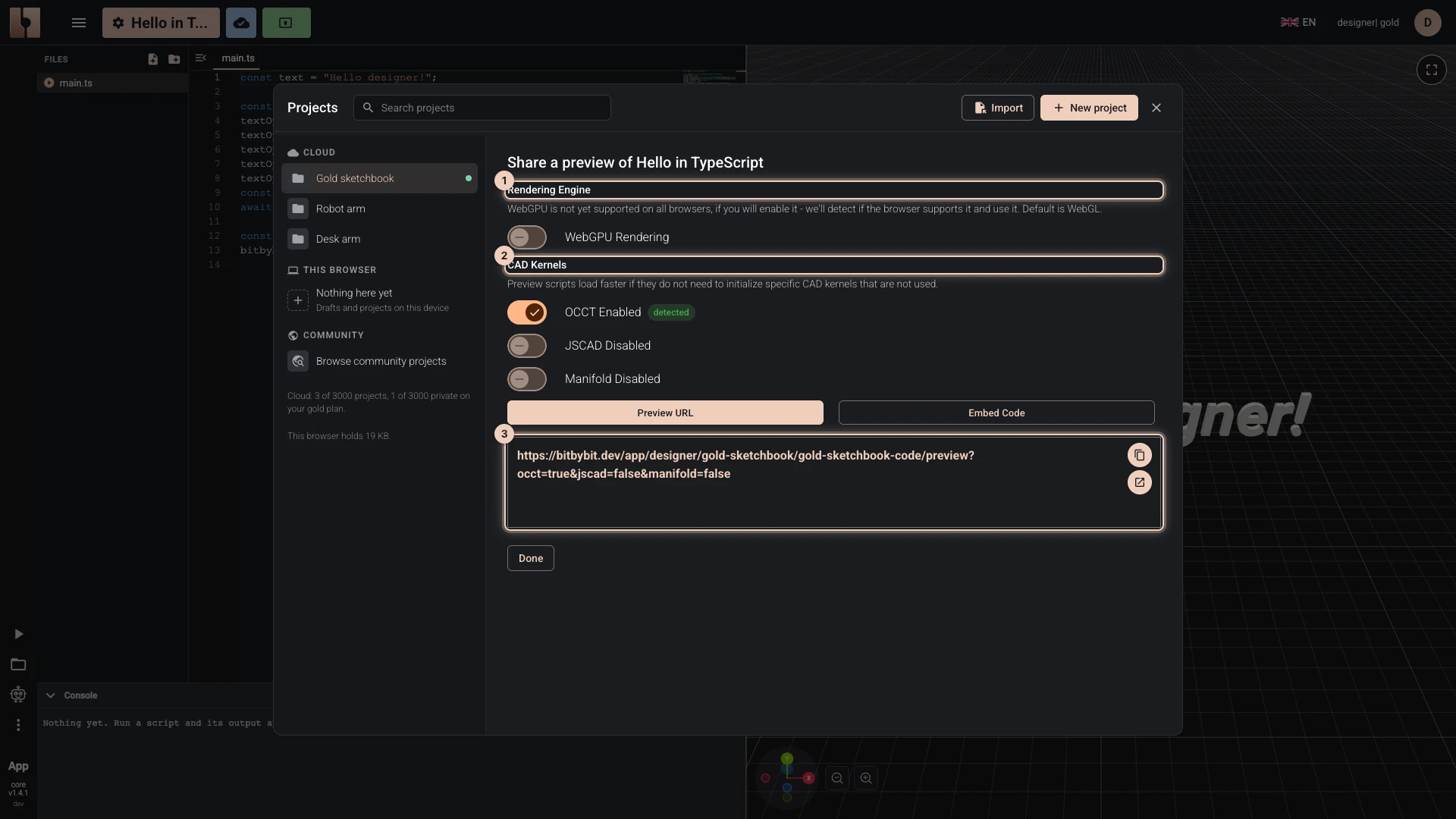
- Open the script in its editor.
- Choose the share button at the left of the bitbybit.dev header (Share script preview), or Share a preview on the script's row in My Projects.
- Choose what the preview loads:
- WebGPU Rendering renders with WebGPU where the browser has it, and WebGL otherwise.
- Under CAD Kernels, switch off the kernels the script does not use: OCCT, JSCAD and Manifold. The ones the script calls are marked detected. Each kernel switched off is one less to download, so the preview opens sooner.
- Copy the Preview URL with Copy to clipboard, or try it with Open preview. Embed Code gives the same preview as an iframe for your website: see Embedding Scripts.
A preview opens for others only when its project is shared: public, or with a community, whose members alone can open it. A private project's preview opens only for you, signed in. Publishing makes a project's code open to others, so read Publishing Your Projects first.
Here is a preview of the Rete script above; its editor shows how it is built.

What the address can say
The share pane writes these into the address for you; you can also add them by hand:
| Parameter | What it does |
|---|---|
engine=webgpu | Renders with WebGPU where the browser has it. |
occt=false | Does not load the Bitbybit OCCT Kernel. |
jscad=false | Does not load the JSCAD kernel. |
manifold=false | Does not load the Manifold kernel. |
ifc=false | Does not load the IFC kernel. |
A kernel is loaded unless its parameter says false. For example, a Gaussian splatting script needs none of them:
https://bitbybit.dev/app/bitbybit/fA0SjbTlMGRei2zMuHuG/TKb4KW7HrgdredHhFOF3/preview?occt=false&jscad=false&manifold=false
The editors read engine=webgpu too, and lang, which sets the language of the visual editors, for example lang=fr. The languages folder lists every language. The kernel parameters work only in previews.
Verified against the product in October 2026