Welcome to Bitbybit
Bitbybit is a geometry engine for the web. It lets you generate, manipulate, and render complex 3D shapes - directly in a browser, on a managed server, through visual programming, or inside your own application. Whether you are a developer building a product configurator, a designer exploring parametric form, or a business looking to automate CAD workflows, Bitbybit gives you the tools to make it happen.
See It in Action
In this short video, our founder Matas Ubarevičius walks through the core ideas behind the platform.
Choose Your Path
We serve a wide range of users. Pick the path that matches your goals and we will point you to the right resources.
| You are a... | What you need | Start here |
|---|---|---|
| Software Developer | Integrate 3D geometry into your web app or backend | Programmer path |
| Enterprise / B2B Team | Evaluate CAD infrastructure or commission custom solutions | Enterprise path |
| Computational Designer | Explore parametric geometry with visual or code tools | Designer path |
| Shopify Merchant | Add 3D product viewers to your storefront | Shopify Merchant path |
| Educator or Teacher | Bring geometry programming into the classroom | Educator path |
| AI coding agent, or the person driving one | Give the agent the exact API and, with a key, hosted CAD compute | AI path |
Not sure where you fit? Keep reading for a quick overview, then explore at your own pace.
How Bitbybit Fits Into Your Website
Most of our users - developers and enterprise clients alike - want to bring interactive 3D into their own websites. The diagram below shows the four integration paths available to you.
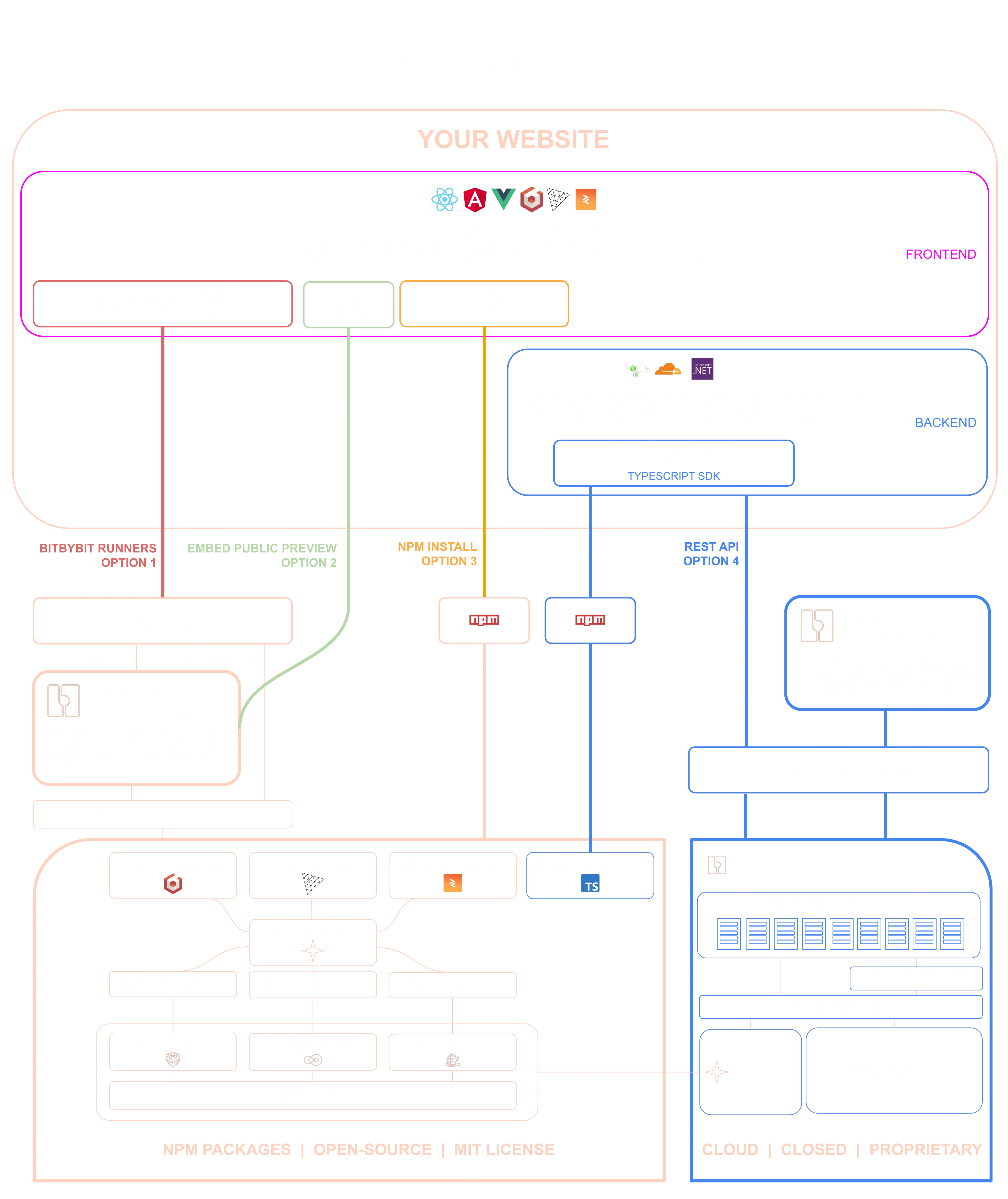
In this deep dive, Matas walks through the diagram above in detail - explaining each integration path with live examples and showing how Bitbybit fits into your website architecture.
Each path connects your website to a different layer of the Bitbybit ecosystem:
Option 1: Bitbybit Runners
Load a single JavaScript file into your frontend - from our CDN or self-hosted on your own infrastructure. The Runner bundles our geometry engine and lets you execute Bitbybit scripts on any webpage - whether exported from our visual editors or written as custom JavaScript with full IntelliSense via our type definition files. No build tools required. Learn more
Option 2: Embed a Public Preview
If you have published a project on bitbybit.dev, you can embed it directly into any webpage using an <iframe>. This is the simplest path - no code at all - though it depends on the Bitbybit platform being available.
Option 3: NPM Install
Install our open-source packages directly into your frontend build (React, Angular, Vue, Svelte, or vanilla JS). This gives you full programmatic control over geometry kernels like OpenCASCADE, JSCAD, and Manifold, running entirely client-side via WebAssembly. Pair them with Three.js, Babylon.js, or PlayCanvas for rendering. Learn more
Option 4: REST API (CAD Cloud)
For server-side workflows, your backend (Node.js, Cloudflare Workers, .NET, or any HTTP client) calls our CAD Cloud API - directly or through our TypeScript SDK. The heavy geometry processing runs on our managed infrastructure and results are returned to your application. You can prototype operations, manage API keys, and preview results through Bitbybit Studio. Learn more
Option 5: Let an AI agent do it
Claude Code, Codex, Cursor, VS Code, claude.ai and ChatGPT can connect to the free Bitbybit CAD MCP and look up the exact API of the version you use while they write; with a key, the Bitbybit CAD Cloud MCP lets the agent run the geometry on CAD Cloud and hand you the files. The AI section explains both.
Visual IDEs
Our browser-based editors let you create 3D logic without writing traditional code. Blockly uses drag-and-drop blocks, Rete offers node-based visual programming, and Monaco provides a full TypeScript environment. All three are free to use - no account required. You can design in these editors and then deploy via Runners (Option 1), embed via iframe (Option 2), or use the same algorithms through NPM packages (Option 3). Learn more
3D Bits for Shopify
An end-to-end Shopify app that adds interactive 3D product viewers and parametric configurators to your storefront. Includes the Composer - a no-code tool for building 3D configurators visually from your GLTF and 3DGS assets. No coding required. Learn more
Free vs. Paid
Our core geometry libraries are free and open-source under the MIT license (third-party dependencies like OpenCASCADE retain their own licenses). The visual IDEs are free to use. Runners are free to deploy.
Paid offerings include:
- Silver & Gold platform subscriptions - Unlock advanced algorithms, private project storage, and community content within the online editors. Pick a plan.
- CAD Cloud API - Usage-based server-side geometry processing, managed through Bitbybit Studio where you purchase API keys and monitor tasks.
- 3D Bits for Shopify - Subscription tiers (Base / Standard / Pro) for 3D product visualization on Shopify storefronts.
- Enterprise services - Custom development and managed infrastructure for B2B clients.
Revenue from these products directly funds continued development of the open-source core - every paid feature makes the free tools better for everyone.
For a detailed breakdown, see Platform & Products.
Next Steps
- New to 3D programming? Start with the Getting Started guide.
- Want to understand the full product suite? Read Platform & Products.
- Curious about our philosophy? See Our Vision.
- Ready to write code right now? Jump into the TypeScript editor.