Drawing Explained: Bringing 3D Objects to Life
How Drawing Works in Bitbybit
You might remember from the "Hello World" tutorial that a special drawing component was needed to make the 3D text appear on your screen. If you had only created the "text 3d" object without drawing it, nothing would have been visible. This section delves a bit into the theory behind why we separate the concept of an object from its visual representation.
The "Platonic" Universe of Objects
Think of it this way: in Bitbybit, 3D objects initially exist in a kind of "Platonic" shadow universe. They are abstract definitions of geometry. As long as they haven't been "drawn," they remain in this conceptual state. You can freely change, combine, and manipulate these abstract objects in various ways before they are made visible.
The act of drawing is the process that creates a visual representation of these abstract, "Platonic" objects. It takes a snapshot of their current geometric state and translates it into a visual description that can be displayed on your screen.
Drawing turns an abstract object into a mesh: the triangles and lines a game engine can put on the screen. That is why you may see "Babylon mesh" on some drawing components.
This diagram illustrates the process:
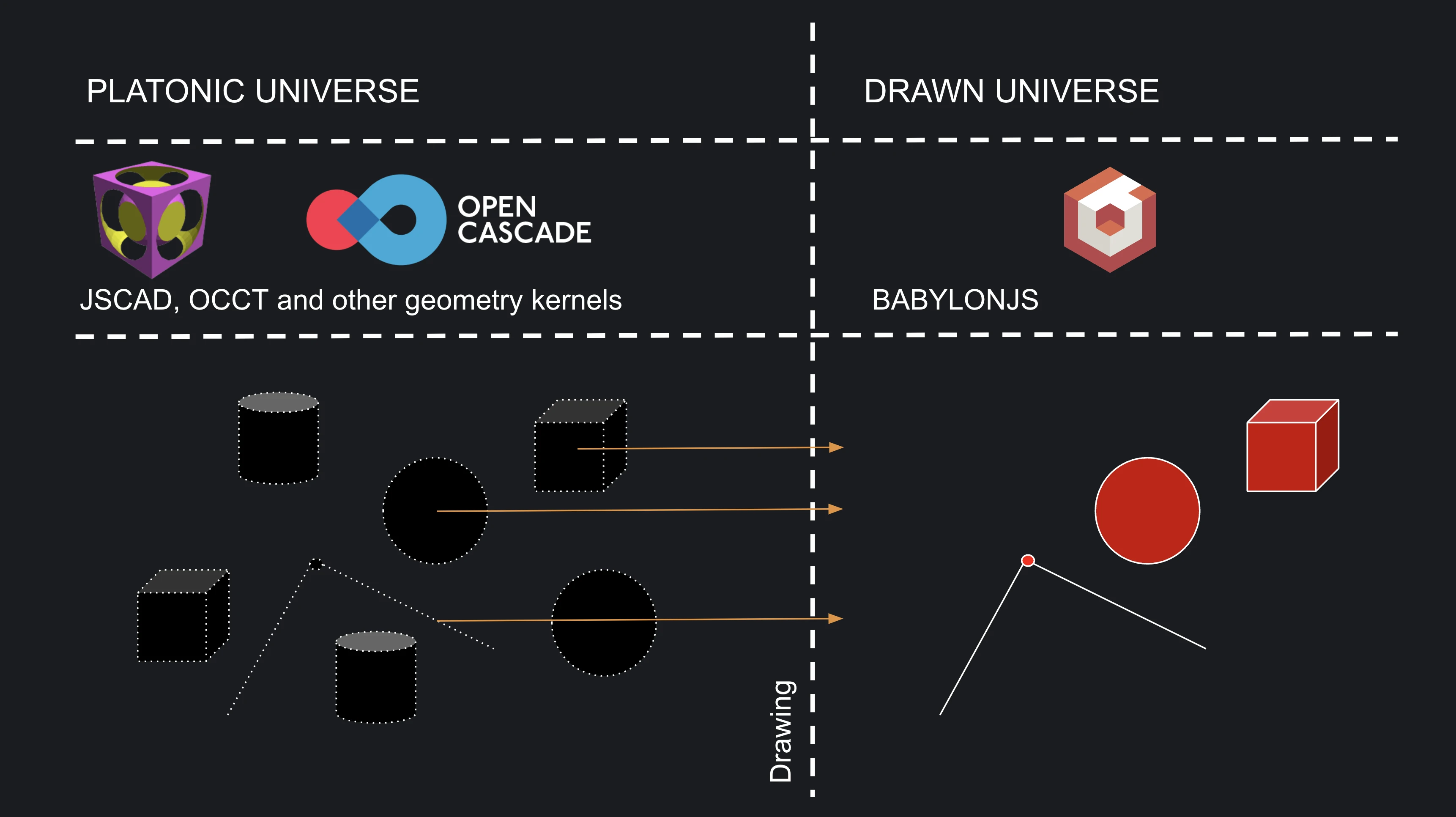 Process of Drawing
As the image suggests, you have control over which objects you choose to draw. For instance, when creating a line, you might not want its individual start and end points to also be drawn as separate visible entities. While possible, we give you the choice.
This selective drawing approach offers a significant performance benefit. You can perform many transformations or complex operations (like boolean operations on solids) on your abstract "Platonic" models without needing to create a visual representation at every intermediate step. You only draw the final result, or specific snapshots you care about. You'll learn more about these operations in later guides.
The game engine that draws
The editors on bitbybit.dev draw with BabylonJS, an open-source 3D engine that runs in the browser: a drawn object is a BabylonJS mesh, and the "babylon" category of the visual editors holds what you can do with one. Bitbybit makes the common things simple. Create a light with shadows, for instance, and every object drawn after it casts and receives them.
In TypeScript you also have the whole BabylonJS API, for anything the editors' own commands do not cover. Outside bitbybit.dev, the same CAD algorithms draw with three.js, BabylonJS or PlayCanvas through the npm packages, by the same rule: you draw what you want to see.
BabylonJS draws with WebGL by default. It can also use WebGPU, the newer graphics API: choose it under More > Settings as the rendering engine. The editor reloads to switch, and stays on WebGL where the browser has no WebGPU.
What Can You Draw?
Simply put, you can draw almost anything that has a three-dimensional form. Primarily, you'll be drawing:
- Points
- Lines and Polylines
- Curves (like splines, arcs, etc.)
- Surfaces
- Various Solids (cubes, spheres, cylinders, custom shapes from CAD operations)
Bitbybit supports many methods for creating these geometric primitives, allowing you to choose the approach that best fits your specific application.
While creating these primitives is crucial, especially for parametric CAD modeling, it's also important to know that you can import and draw ready-made 3D assets created in other software packages.
Here are a few examples of imported assets drawn in Bitbybit, each running in a preview of its public script:
Drawn GLTF Unicorns

Drawn STEP Spaceship
Drawn GLTF Flight Helmet
What is a "Drawn Object"?
In basic terms, a drawn object in Bitbybit becomes a BabylonJS Mesh. While this mesh is a visual snapshot of an object from the "Platonic" universe, it doesn't mean it's static or unchangeable after being drawn.
In fact, you can do many powerful things with these drawn BabylonJS Meshes:
- Transform: Change their position, rotation, and scale.
- Appearance: Apply various materials and textures.
- Optimize: Clone them or create highly optimized GPU instances for drawing many similar objects efficiently.
- Interact: Make them respond to click events, ray intersections (e.g., what the mouse is pointing at), or bounding box collisions (detecting if objects touch).
- Hierarchy: Group them into different coordinate systems (called "Nodes" or "TransformNodes" in BabylonJS). Transformations applied to a parent node will affect all its child meshes, allowing for complex animations and scene organization.
These capabilities enable you to create rich and interactive 3D experiences on the Bitbybit platform.
By default, when you use a "Draw" component, the object becomes visible on the screen. However, you can also choose to draw objects and then hide them initially. This is useful in scenarios like:
- Loading an asset for a game but keeping it hidden until the player clicks a button or enters a specific area.
The components that allow you to manipulate drawn BabylonJS meshes are typically found in the "Babylon" category of our visual editors. There's a lot of potential here, and we'll explore many of these techniques in later tutorials.
Verified against the product in October 2026