Build a drone: sizes, stage and the frame
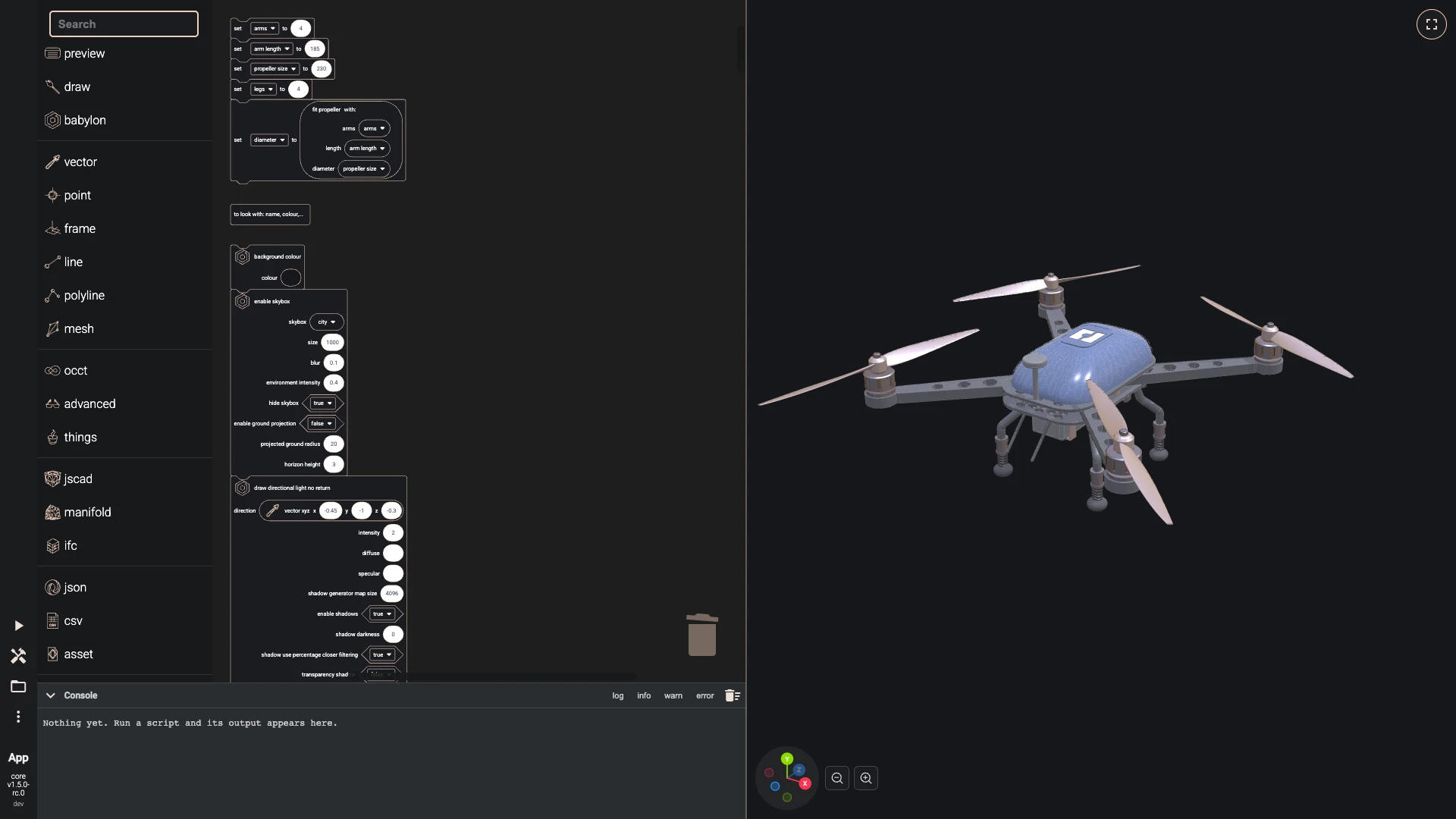
Over seven chapters you build this drone in the Blockly editor: a carbon frame of two plates, arms that carry motors, propellers, bolts and lights, a canopy traced with a honeycomb and marked with the bitbybit logo, sprung landing legs and a camera, all sized by four variables. It is the same drone the Rete and TypeScript tutorials build, made of blocks: every part is a function, and short stacks call the functions and draw what they return. It is the showcase of the Blockly editor.
The drone is built in millimetres. Open a new Blockly editor and follow the steps; Variables and functions shows how to make a variable and a function and where their blocks appear. The steps write blocks as text:
- cylinder(radius 6, center point xyz(52, 0, 0)) is the cylinder block with those inputs set; the inputs it does not name keep the values the block comes with.
- plate in italics is a variable, and around in bold italics is a call of a function you made.
- [a, b] is a create list with block holding a and b, and (a + b) is an arithmetic block.
- await waits for a result before the blocks after it use it. A function with an await block in it runs as async: the blocks that call it wait for it to finish.
Functions take room, so the pictures show the functions of earlier steps collapsed: right-click a function and choose Collapse Block, and expand it the same way. Right-click the empty workspace and choose Clean up Blocks to line the stacks up; they run from top to bottom.
This chapter sets the sizes, lights the stage and makes the frame.
-
Four variables size the whole drone: the arms, how long they are, the propeller's diameter and the legs. A function, fit propeller, works out the largest propeller that clears its neighbours and the canopy; a function is a stack of blocks with a name and inputs, and its return gives its answer to the block that calls it.
- Make the function fit propeller with the inputs arms, length, diameter:
- set neighbours to (((2 × length) × sin((pi ÷ arms))) - 10)
- set canopy room to (2 × (length - 68))
- set largest to (round down ((if (neighbours < canopy room) then neighbours else canopy room) ÷ 5) × 5)
- return (if (diameter < largest) then diameter else largest)
- Add a stack under the others:
- set arms to 4
- set arm length to 185
- set propeller size to 230
- set legs to 4
- set diameter to fit propeller(arms, arm length, propeller size)
- Run it with Run The Code.
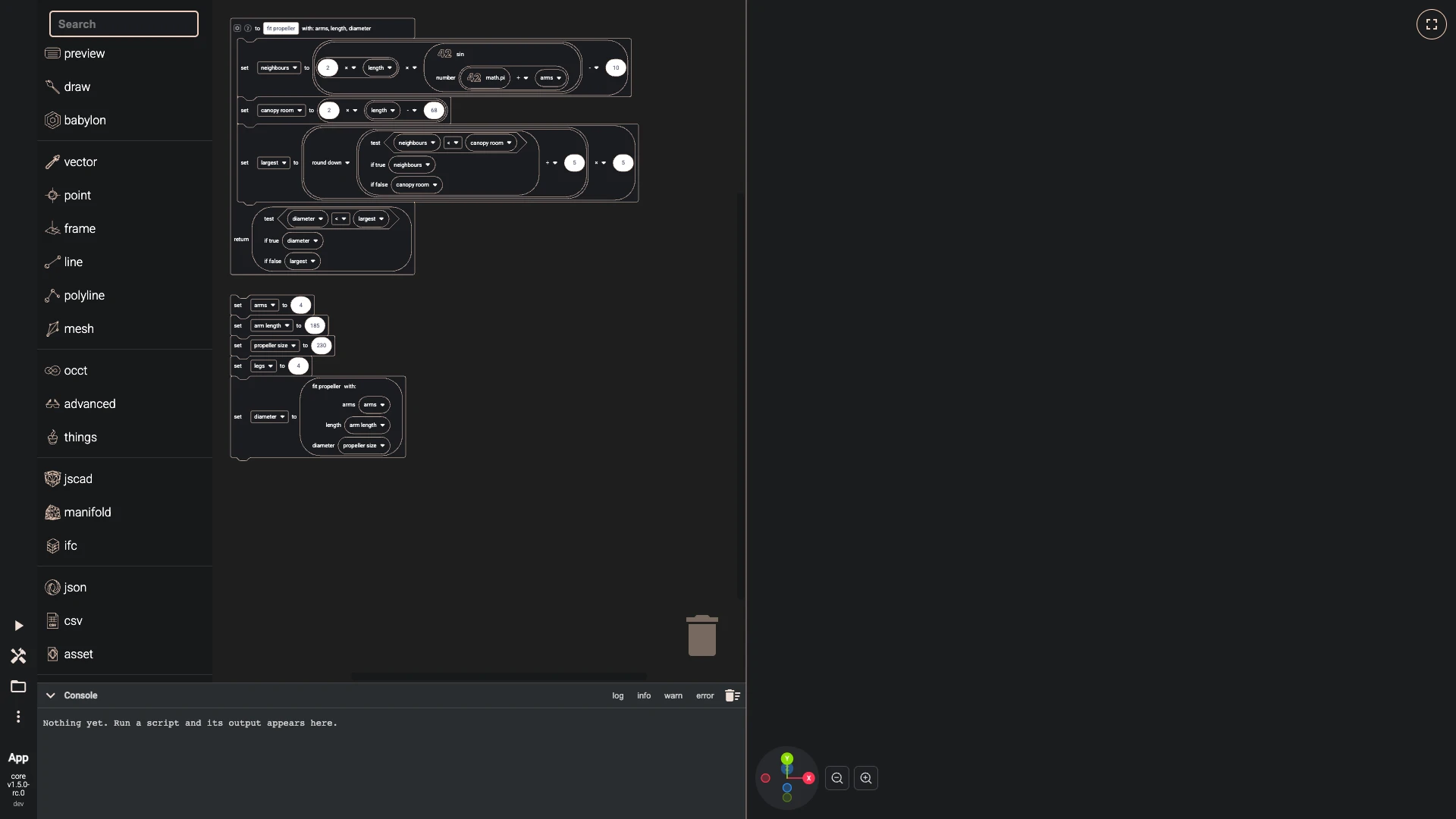
- Make the function fit propeller with the inputs arms, length, diameter:
-
Set the stage before the first part: a dark background, a city environment that metal reflects with its picture hidden, a sun that casts shadows, and the camera placed outside the drone, far enough to see all of it. The function look makes the drawing options of one material, physically based and drawn a little behind its edges, so the white edges on the dark parts stay sharp; every part is drawn through one of its calls.
- Make the function look with the inputs name, colour, metallic, roughness, glow, edge colour, edge width:
- return options occt shape(face material pbr metallic roughness(name name, base color colour, emissive color glow, metallic metallic, roughness roughness, alpha 1, back face culling false, z offset 2), precision 0.05, draw two sided false, draw edges (edge width > 0), edge colour edge colour, edge width edge width)
- Add a stack under the others:
- background colour(
#15171a) - enable skybox(skybox city, environment intensity 0.4, hide skybox true)
- draw directional light no return(direction vector xyz(-0.45, -1, -0.3), intensity 2, shadow generator map size 4096, shadow bias 0.0003, shadow normal bias 1, shadow min z -1000, shadow max z 1000)
- adjust active arc rotate camera(position point xyz(620, 380, 760), look at point xyz(0, -20, 0), max z 20000, panning sensibility 2)
- background colour(
- Run it with Run The Code.
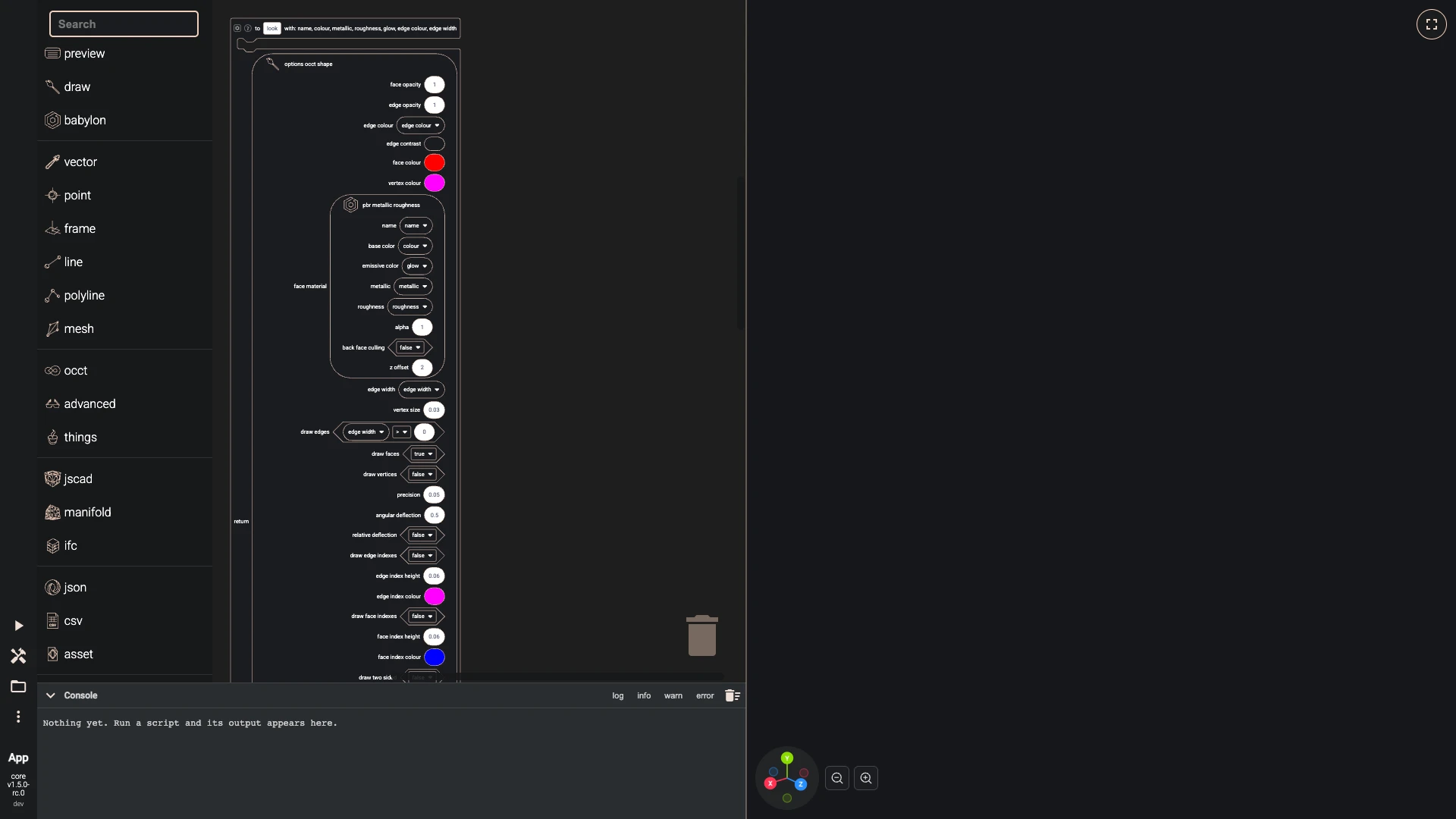
- Make the function look with the inputs name, colour, metallic, roughness, glow, edge colour, edge width:
-
The frame plate is a function too: a rounded rectangle, 96 by 150 millimetres, made into a face and extruded 3 millimetres, with hexagon vents from a grid cut through it at the front and the back. The main stack places a second plate 13 millimetres above the first and draws both in carbon.
- Make the function frame plate:
- set outline to fillet 2d(shape rectangle wire(width 96, length 150), radius 26)
- set slab to extrude(shape face from wire(shape outline, planar true), direction vector xyz(0, 3, 0))
- set hexagons to hexagons in grid(width 56, height 20, nr hexagons in width 5, nr hexagons in height 2, flat top true, scale pattern width [0.8], scale pattern height [0.8])
- set vents to make compound(extrude shapes(shapes faces from wires(shapes hexagons, planar true), direction vector xyz(0, 3, 0)))
- return difference(shape slab, shapes [translate(shape vents, translation vector xyz(0, 0, 60)), translate(shape vents, translation vector xyz(0, 0, -60))], keep edges false)
- Add a stack under the others:
- set plate to frame plate()
- set top plate to translate(shape plate, translation vector xyz(0, 13, 0))
- set carbon to look("carbon",
#23262b, 0.35, 0.45,#000000,#f2f2f2, 6) - draw any async no return(entity [plate, top plate], options carbon)
- Run it with Run The Code.
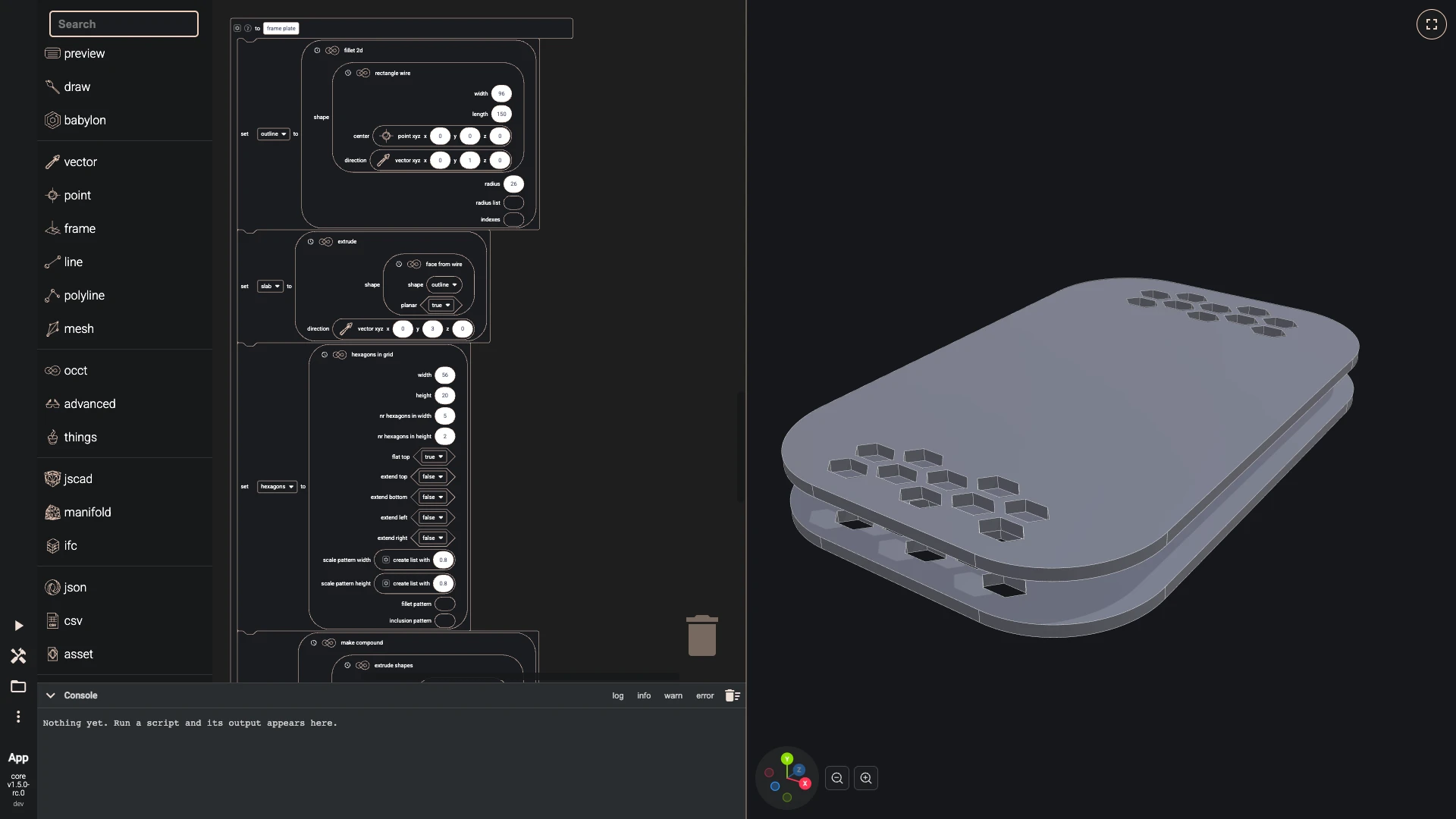
- Make the function frame plate:
Next: around, bolts and standoffs.
Verified against the product in October 2026