A tour of the Blockly editor
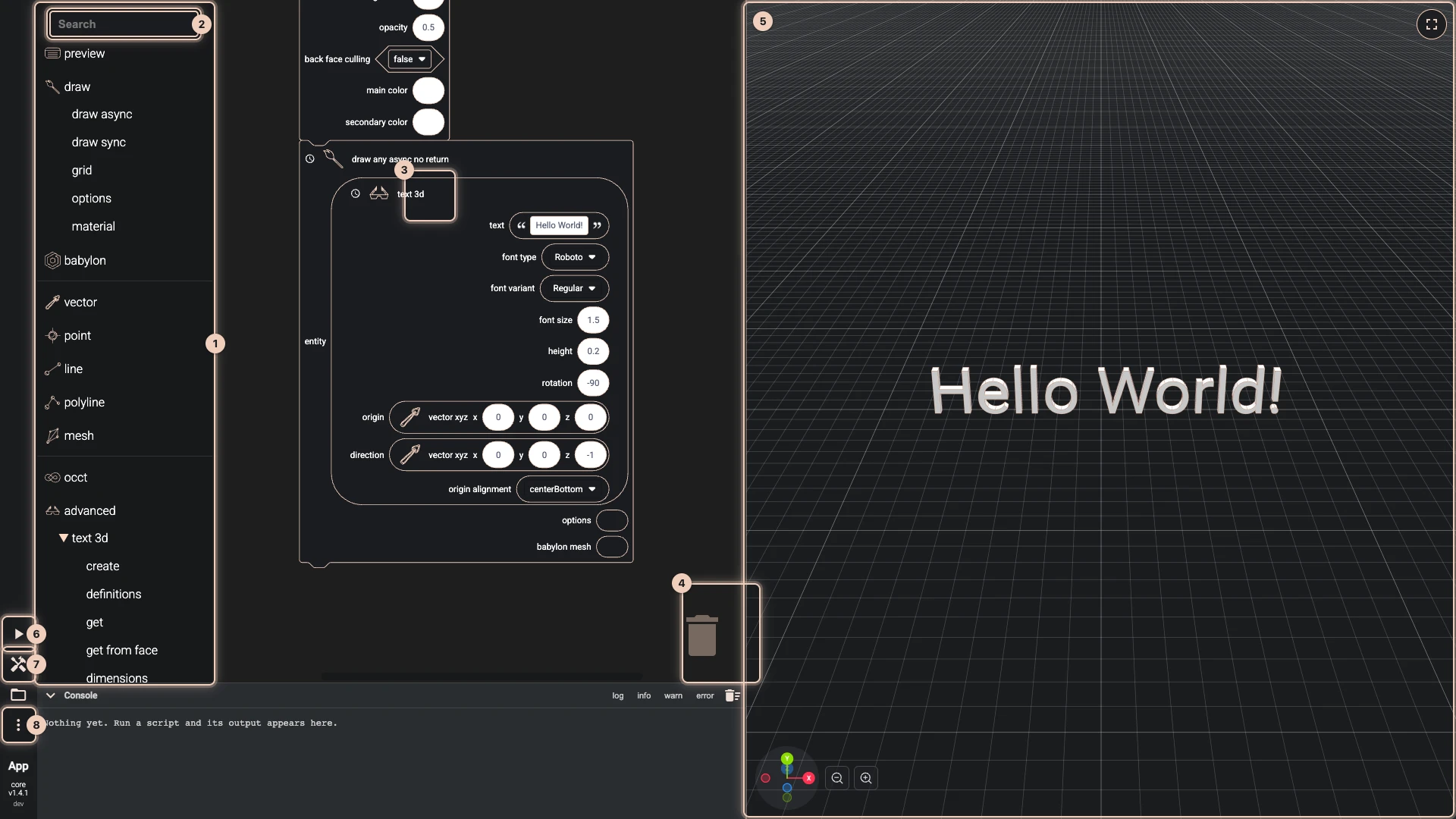
The numbers match the picture, which shows the script Hello World builds.
- The toolbox. The blocks by category: the Bitbybit API first (draw, babylon, occt, advanced and the rest), Blockly's own (variables, functions, loops, logic, math, lists, colour and text) at the bottom. A category that holds others opens below itself when clicked; the last one shows its blocks in a flyout beside the toolbox.
- The search. Type part of a block's name, and the flyout lists every block that matches.
- A block. Its inputs come with blocks plugged in, holding values to start from. A clock in its title means the block waits for its result, such as a solid the CAD kernel makes.
- The trash can. Drop a block on it to delete it.
- The 3D view. What the script draws. Turn it with the left mouse button, pan with the right, zoom with the wheel.
- Run The Code. Runs the script. Blockly runs only when you press it.
- The toolbox button. Hides the toolbox, to give the workspace more room, and shows it again.
- More. Import, export, copy and paste the script, Export to runner, Clean Canvas, settings, and links to the documentation.
Drag the empty workspace to move around it, and use the wheel to zoom. The console sits under the workspace; Running code explains it and the split between the workspace and the 3D view.
Verified against the product in October 2026