Build a drone: one arm
An arm carries most of the drone's detail: a function for each part, and one stack that calls them and draws one arm along the x axis. The next chapter repeats it.
-
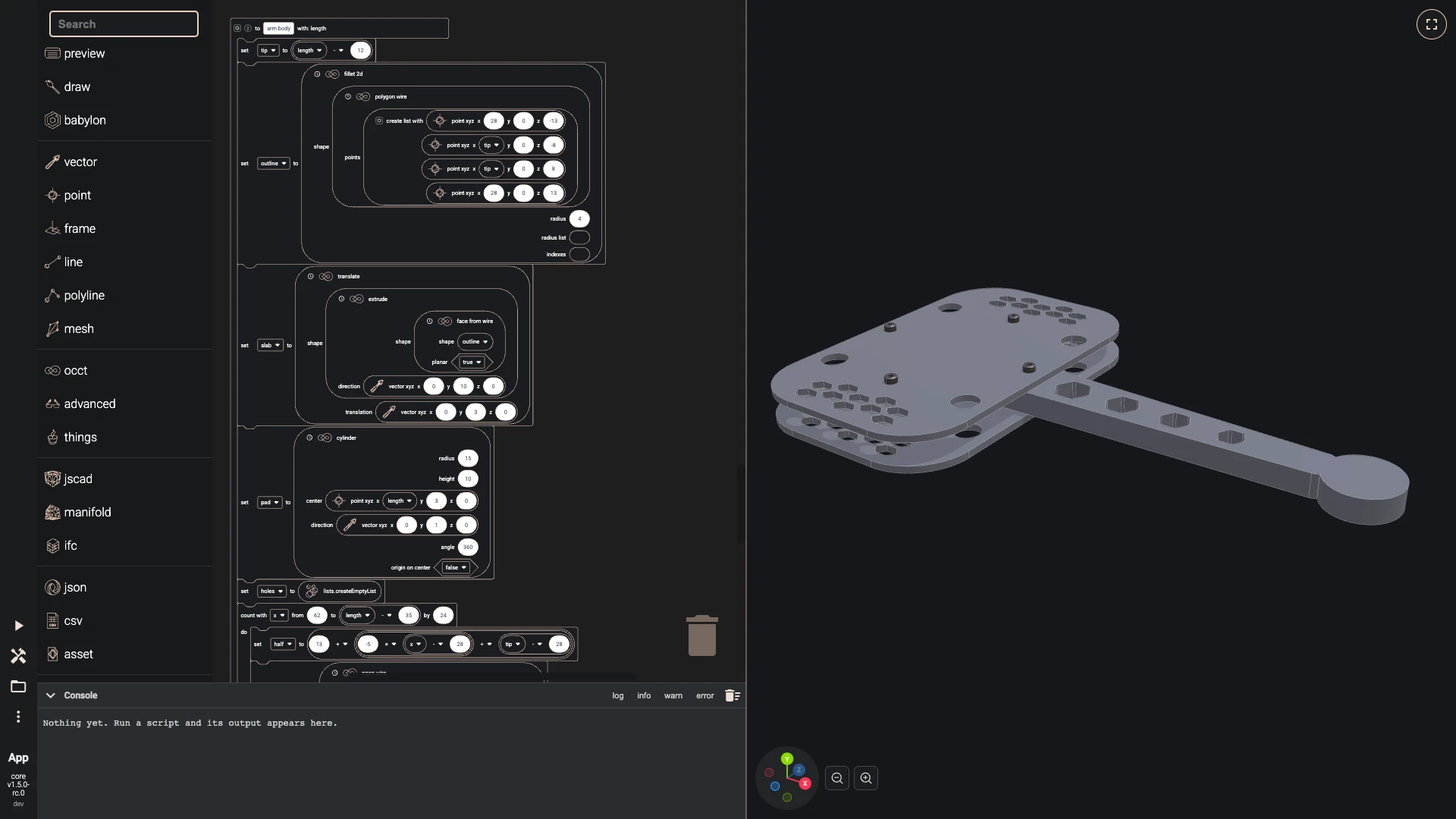
An arm narrows from 26 millimetres at the root to 16 at the tip, is rounded and extruded 10 millimetres onto the plate, and carries a round pad for the motor at its tip. A count loop steps along the arm every 24 millimetres and adds a rounded hexagon, sized to the arm's width there, to a list of holes that the difference cuts away. This chapter draws one arm, along the x axis.
- Make the function arm body with the inputs length:
- set tip to (length - 12)
- set outline to fillet 2d(shape polygon wire([point xyz(28, 0, -13), point xyz(tip, 0, -8), point xyz(tip, 0, 8), point xyz(28, 0, 13)]), radius 4)
- set slab to translate(shape extrude(shape face from wire(shape outline, planar true), direction vector xyz(0, 10, 0)), translation vector xyz(0, 3, 0))
- set pad to cylinder(radius 15, height 10, center point xyz(length, 3, 0), direction vector xyz(0, 1, 0))
- set holes to empty list
- count with x from 62 to (length - 35) by 24:
- set half to (13 + ((-5 × (x - 28)) ÷ (tip - 28)))
- set hexagon to ngon wire(nr corners 6, radius (if ((half - 3.5) > 2.5) then (half - 3.5) else 2.5), center point xyz(x, 3, 0), direction vector xyz(0, 1, 0))
- set holes to add item(list holes, item extrude(shape face from wire(shape fillet 2d(shape hexagon, radius 1.2), planar true), direction vector xyz(0, 10, 0)), clone false)
- return difference(shape union(shapes [slab, pad], keep edges false), shapes holes, keep edges false)
- Add a stack under the others:
- set one arm to arm body(arm length)
- draw any async no return(entity one arm, options carbon)
- Run it with Run The Code.
- Make the function arm body with the inputs length:
-
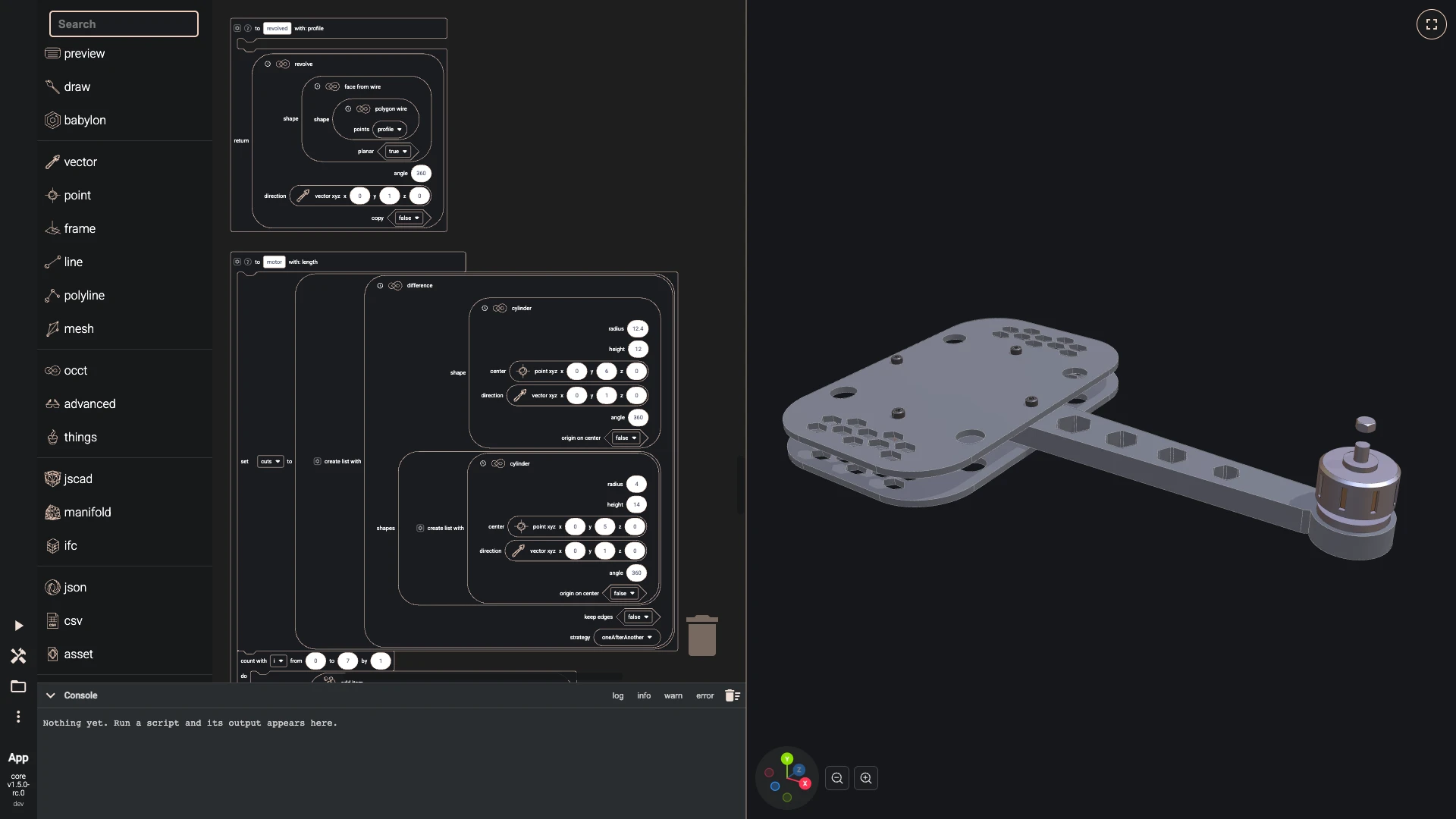
The motor's body is a profile revolved around its shaft, so a small function, revolved, does that for any list of points. A loop cuts eight cooling slots, and the propeller nut sits on top. The copper stator inside shows through the slots.
- Make the function revolved with the inputs profile:
- return revolve(shape face from wire(shape polygon wire(profile), planar true), angle 360, direction vector xyz(0, 1, 0), copy false)
- Make the function motor with the inputs length:
- set cuts to [difference(shape cylinder(radius 12.4, height 12, center point xyz(0, 6, 0), direction vector xyz(0, 1, 0)), shapes [cylinder(radius 4, height 14, center point xyz(0, 5, 0), direction vector xyz(0, 1, 0))], keep edges false)]
- count with i from 0 to 7 by 1:
- set cuts to add item(list cuts, item rotate(shape box(width 2.2, length 8, height 9, center point xyz(0, 13, 12)), axis vector xyz(0, 1, 0), angle (i × 45)), clone false)
- set housing to difference(shape revolved([point xyz(0, 0, 0), point xyz(13, 0, 0), point xyz(13, 3, 0), point xyz(8, 3, 0), point xyz(8, 6, 0), point xyz(14, 6, 0), point xyz(14, 19, 0), point xyz(12.8, 20, 0), point xyz(6, 20, 0), point xyz(6, 22, 0), point xyz(2.5, 22, 0), point xyz(2.5, 28, 0), point xyz(0, 28, 0)]), shapes cuts, keep edges false)
- set nut to intersection(shapes [extrude(shape face from wire(shape ngon wire(nr corners 6, radius 3.6, center point xyz(0, 34, 0), direction vector xyz(0, 1, 0)), planar true), direction vector xyz(0, 3.5, 0)), revolved([point xyz(0, 34, 0), point xyz(2.9, 34, 0), point xyz(3.7, 34.7, 0), point xyz(3.7, 36.8, 0), point xyz(2.9, 37.5, 0), point xyz(0, 37.5, 0)])], keep edges false)
- return translate(shape make compound([housing, nut]), translation vector xyz(length, 13, 0))
- Make the function stator with the inputs length:
- return translate(shape cylinder(radius 11.8, height 11, center point xyz(0, 6.5, 0), direction vector xyz(0, 1, 0)), translation vector xyz(length, 13, 0))
- Snap under the block draw any async no return(entity one arm, options carbon):
- set aluminium to look("aluminium",
#b9bec6, 1, 0.32,#000000,#0d0e10, 4) - set copper to look("copper",
#b87333, 1, 0.5,#000000,#0d0e10, 4) - set one motor to motor(arm length)
- draw any async no return(entity one motor, options aluminium)
- set one stator to stator(arm length)
- draw any async no return(entity one stator, options copper)
- set aluminium to look("aluminium",
- Run it with Run The Code.
- Make the function revolved with the inputs profile:
-
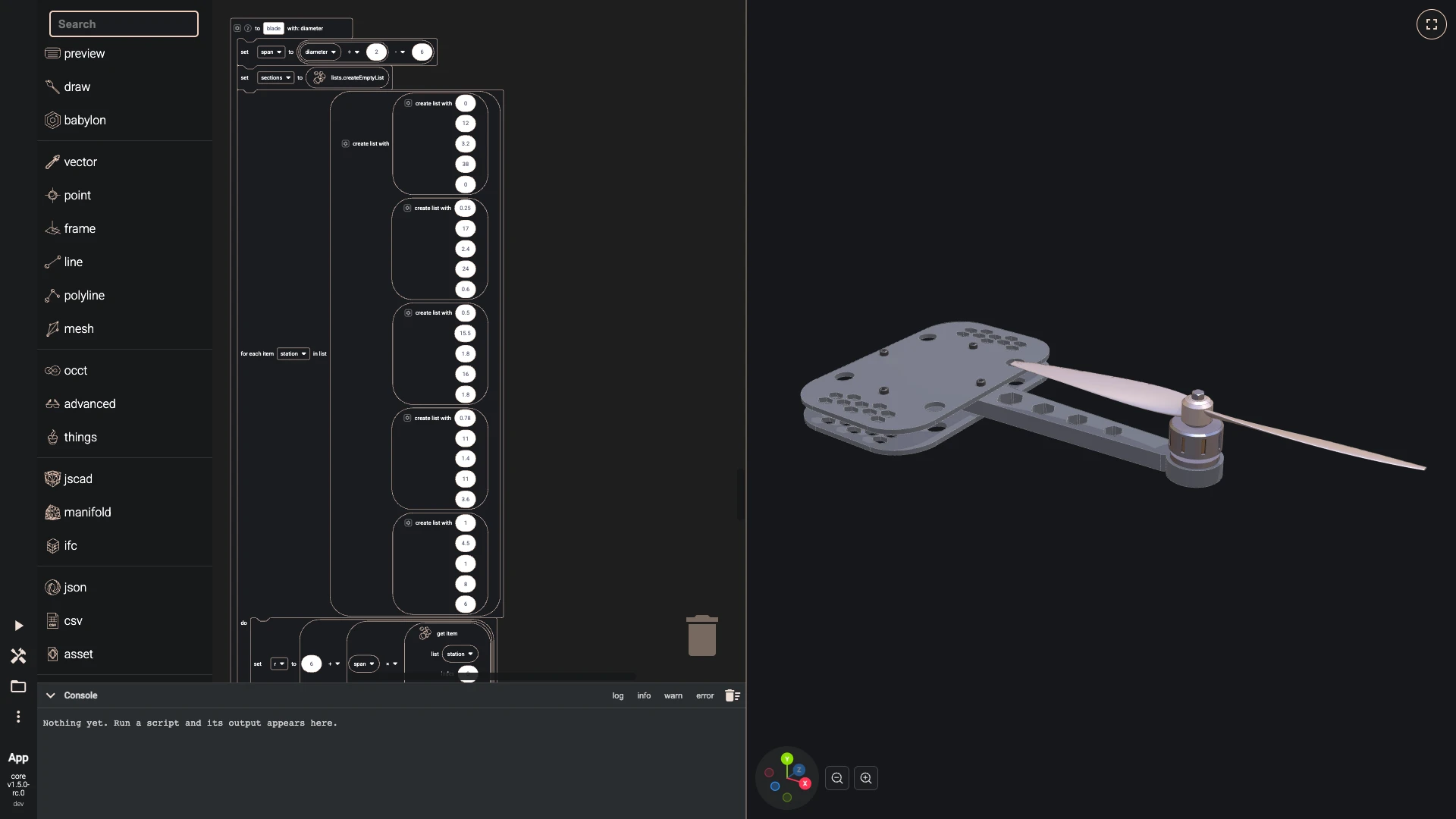
A blade is lofted through five twisted ellipses, from a thick root to a thin, swept tip. The stations are a list of lists of numbers, and a for each loop turns each into a section. A second blade half a turn round and a revolved hub complete the propeller at the diameter fit propeller worked out.
- Make the function blade with the inputs diameter:
- set span to ((diameter ÷ 2) - 6)
- set sections to empty list
- for each item station in [[0, 12, 3.2, 38, 0], [0.25, 17, 2.4, 24, 0.6], [0.5, 15.5, 1.8, 16, 1.8], [0.78, 11, 1.4, 11, 3.6], [1, 4.5, 1, 8, 6]]:
- set r to (6 + (span × get item(list station, index 0, clone false)))
- set ellipse to ellipse wire(center point xyz(r, 0, get item(list station, index 4, clone false)), direction vector xyz(1, 0, 0), radius minor (get item(list station, index 2, clone false) ÷ 2), radius major (get item(list station, index 1, clone false) ÷ 2))
- set sections to add item(list sections, item rotate around center(shape ellipse, angle get item(list station, index 3, clone false), center point xyz(r, 0, get item(list station, index 4, clone false)), axis vector xyz(1, 0, 0)), clone false)
- return loft(shapes sections, make solid true)
- Make the function propeller with the inputs length, diameter:
- set first blade to blade(diameter)
- set hub to revolve(shape face from wire(shape polygon wire([point xyz(0, -5, 0), point xyz(8, -5, 0), point xyz(8, 4.5, 0), point xyz(6.5, 6.2, 0), point xyz(4.5, 7, 0), point xyz(0, 7, 0)]), planar true), angle 360, direction vector xyz(0, 1, 0), copy false)
- return translate(shape union(shapes [hub, first blade, rotate(shape first blade, axis vector xyz(0, 1, 0), angle 180)], keep edges false), translation vector xyz(length, 40, 0))
- Snap under the block draw any async no return(entity one stator, options copper):
- set one propeller to propeller(arm length, diameter)
- draw any async no return(entity one propeller, options accent)
- Run it with Run The Code.
- Make the function blade with the inputs diameter:
-
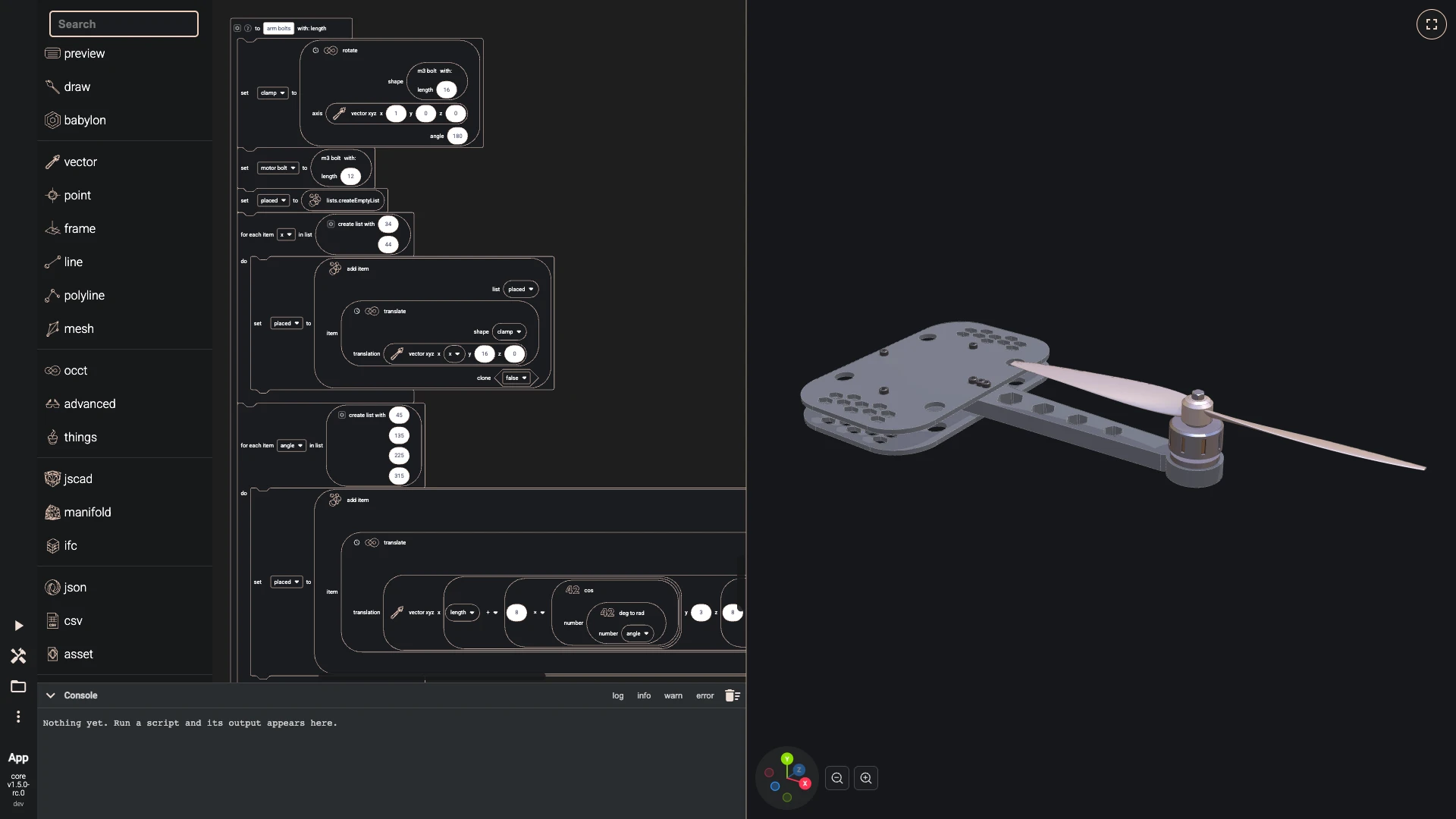
Six bolts hold the arm, two clamping it between the plates and four fixing the motor from below, all the M3 bolt again. An LED dome hangs under the arm.
- Make the function arm bolts with the inputs length:
- set clamp to rotate(shape m3 bolt(16), axis vector xyz(1, 0, 0), angle 180)
- set motor bolt to m3 bolt(12)
- set placed to empty list
- for each item x in [34, 44]:
- set placed to add item(list placed, item translate(shape clamp, translation vector xyz(x, 16, 0)), clone false)
- for each item angle in [45, 135, 225, 315]:
- set placed to add item(list placed, item translate(shape motor bolt, translation vector xyz((length + (8 × cos(deg to rad(angle)))), 3, (8 × sin(deg to rad(angle))))), clone false)
- return make compound(placed)
- Make the function light with the inputs length:
- return difference(shape sphere(radius 3, center point xyz((length - 24), 3, 0)), shapes [box(width 8, length 8, height 4, center point xyz((length - 24), 5, 0))], keep edges false)
- Snap under the block draw any async no return(entity one propeller, options accent):
- set arm fixings to arm bolts(arm length)
- draw any async no return(entity arm fixings, options steel)
- set green to look("green",
#22ff66, 0, 0.2,#22ff66,#0d0e10, 0) - set one light to light(arm length)
- draw any async no return(entity one light, options green)
- Run it with Run The Code.
- Make the function arm bolts with the inputs length:
Next: arms around the frame.
Verified against the product in October 2026