References to faces and edges
A fillet rounds edges, a hole starts from a face, a sketch can lie on one. The feature keeps those faces and edges as references, and the way it names them decides whether it still works after you change the part.
Named by what made them
The Designer never stores "face number 7", which would point at another face as soon as the part changed. It names a face by the feature that made it and the face's role there:
- the end or the start face of an extrude, a boss or a pocket, the faces it swept away from and towards;
- a side face, made by one pen command of the sketch, named after that command's id, such as the side made by the
bellyarc; - the wall of a hole at one of its positions.
An edge is named by the two faces it lies between, such as "between the end of link and the side of lighten". When you click a face or an edge for a feature, the dialog shows how many you picked, and As JSON shows the names it keeps.
So when length changes, or a feature earlier in the list changes, the fillet still finds the edges between those two faces, wherever they are now.
When a change takes a face away
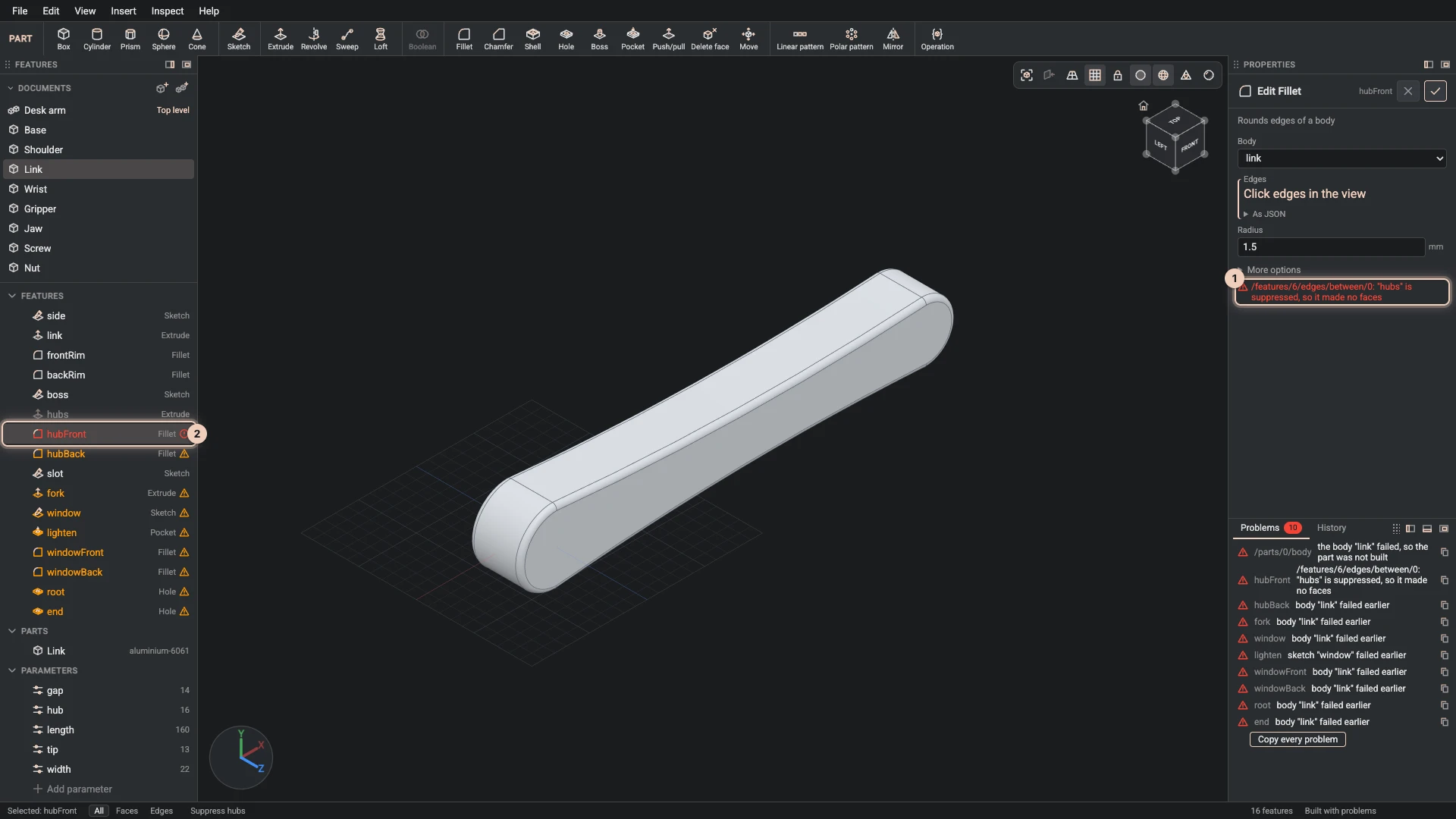
Some changes really do remove what a reference names: a pocket deleted, a sketch line taken out, a feature suppressed. Then:
- the feature that lost its reference turns red in the Features panel, and the features after it on the same body are marked too, since they could not be built;
- the Problems tab says which field lost what, and why;
- its dialog shows the same message under the field.
The picture shows the desk arm's link after its hubs extrude was suppressed: the fillet hubFront named edges of the hubs' end face, which no longer exists.
Pointing it somewhere else
- Pick again. Open the feature with Edit feature, Clear the field, and click the faces or edges it should use now.
- Repair reference. When the build finds faces much like the ones that were lost, the Problems tab offers to use them, and one click does. Check the result in the view: the build chose what looks most alike, not what you meant.
- Undo the change that took the face away, or restore the suppressed feature, and the reference finds its face again.
A reference that names something a feature makes later in the list is refused when you reorder features, so a feature can never depend on what comes after it. History explains reordering.
Verified against the product in October 2026