IFC building models
IFC is the open file format of building models (BIM): not just the shapes of a building but what each part is, a wall, a door or a slab, on which storey it stands, what it is made of and what its properties are. Architects' and engineers' tools read and write it. bitbybit.ifc writes such models from a script, reads existing files, changes them and builds their geometry.
The IFC functions are experimental: what they cover grows, and an input may still change. The editors mark them as beta and say so in the console when a script uses them.
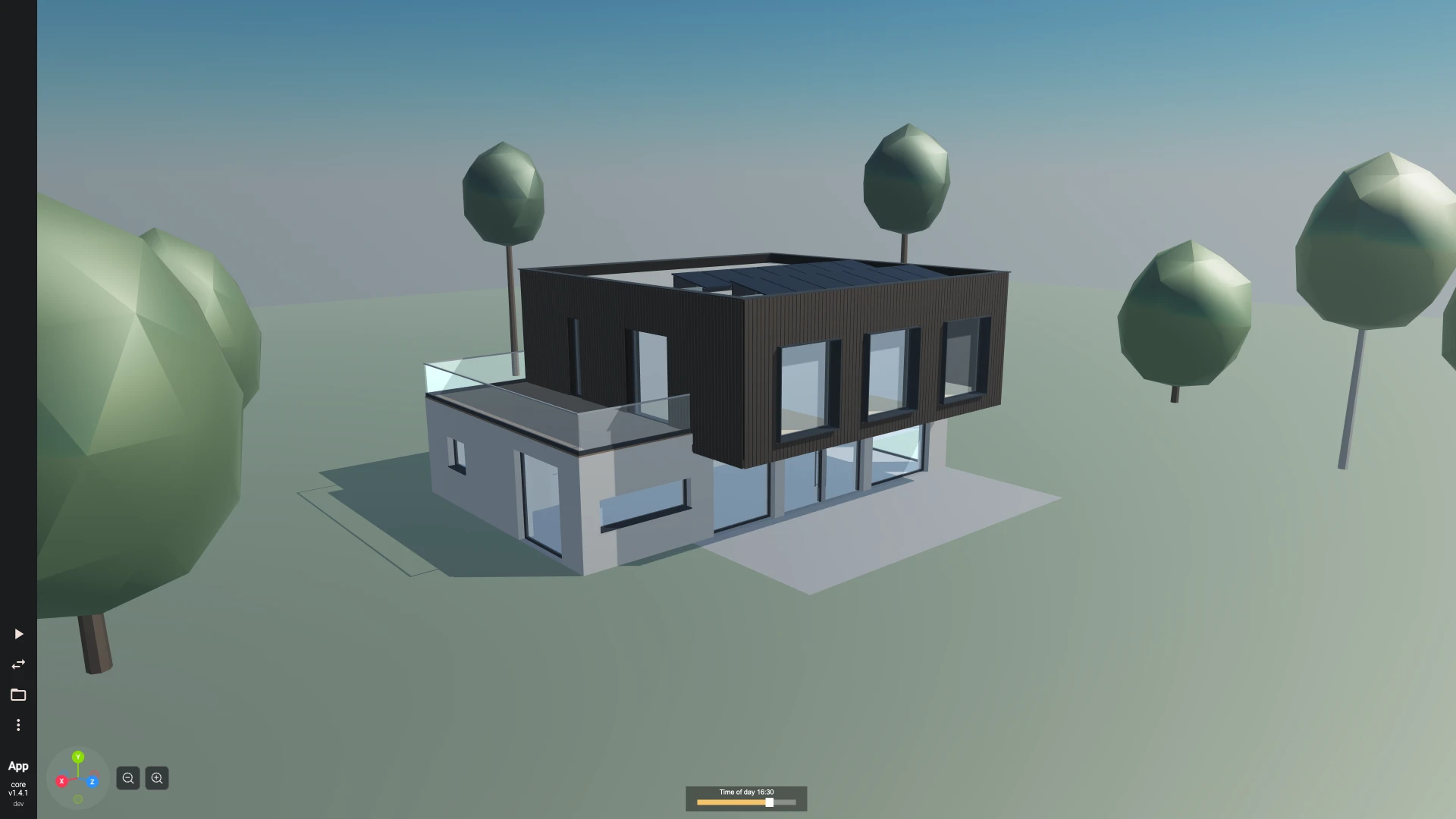
A whole building is written the same way: a family house in IFC is a two-storey house of some 700 elements, in a project you can open, run and change.
A model, step by step
A model is built by a chain of calls. model.create starts one with a project, a site and one building; spatial.addStorey adds the storeys; then walls, slabs, roofs, columns and beams go on the storeys, and doors and windows into the walls.
Every call that changes a model gives back the changed model and leaves the one it was given as it was, so each call takes the model the call before returned. In Rete and Blockly that is one chain of components or blocks; in TypeScript, one variable you keep reassigning.
Here a wall gets a window. A window type is added first, and the window is placed from it, cutting its opening in the wall:
- Rete
- Blockly
- TypeScript


{
  "id": "rete-v2-json",
  "nodes": {
    "model": {
      "id": "model",
      "name": "bitbybit.ifc.model.create",
      "customName": "create model",
      "async": true,
      "drawable": false,
      "data": {
        "genericNodeData": {
          "hide": false,
          "oneOnOne": false,
          "flatten": 0,
          "forceExecution": false
        },
        "name": "Project",
        "siteName": "Site",
        "buildingName": "Building",
        "lengthUnit": "metre",
        "seed": "learn",
        "author": "",
        "organization": ""
      },
      "inputs": {},
      "position": [
        40,
        40
      ]
    },
    "storey": {
      "id": "storey",
      "name": "bitbybit.ifc.spatial.addStorey",
      "customName": "add storey",
      "async": true,
      "drawable": false,
      "data": {
        "genericNodeData": {
          "hide": false,
          "oneOnOne": false,
          "flatten": 0,
          "forceExecution": false
        },
        "id": "ground",
        "name": "Storey",
        "elevation": 0
      },
      "inputs": {
        "model": {
          "connections": [
            {
              "node": "model",
              "output": "result",
              "data": {}
            }
          ]
        }
      },
      "position": [
        460,
        40
      ]
    },
    "wall": {
      "id": "wall",
      "name": "bitbybit.ifc.walls.add",
      "customName": "add wall",
      "async": true,
      "drawable": false,
      "data": {
        "genericNodeData": {
          "hide": false,
          "oneOnOne": false,
          "flatten": 0,
          "forceExecution": false
        },
        "storey": "ground",
        "id": "wall",
        "name": "",
        "height": 2.8,
        "thickness": 0.2,
        "layerSet": "",
        "alignment": "center",
        "baseOffset": 0,
        "wallType": "",
        "predefinedType": "STANDARD"
      },
      "inputs": {
        "model": {
          "connections": [
            {
              "node": "storey",
              "output": "result",
              "data": {}
            }
          ]
        },
        "start": {
          "connections": [
            {
              "node": "start",
              "output": "result",
              "data": {}
            }
          ]
        },
        "end": {
          "connections": [
            {
              "node": "end",
              "output": "result",
              "data": {}
            }
          ]
        }
      },
      "position": [
        880,
        40
      ]
    },
    "start": {
      "id": "start",
      "name": "bitbybit.point.pointXY",
      "customName": "point xy",
      "async": false,
      "drawable": false,
      "data": {
        "genericNodeData": {
          "hide": true,
          "oneOnOne": false,
          "flatten": 0,
          "forceExecution": false
        },
        "x": 0,
        "y": 0
      },
      "inputs": {},
      "position": [
        460,
        520
      ]
    },
    "end": {
      "id": "end",
      "name": "bitbybit.point.pointXY",
      "customName": "point xy",
      "async": false,
      "drawable": false,
      "data": {
        "genericNodeData": {
          "hide": true,
          "oneOnOne": false,
          "flatten": 0,
          "forceExecution": false
        },
        "x": 4,
        "y": 0
      },
      "inputs": {},
      "position": [
        460,
        860
      ]
    },
    "type": {
      "id": "type",
      "name": "bitbybit.ifc.windows.addType",
      "customName": "add window type",
      "async": true,
      "drawable": false,
      "data": {
        "genericNodeData": {
          "hide": false,
          "oneOnOne": false,
          "flatten": 0,
          "forceExecution": false
        },
        "id": "window-type",
        "name": "Window",
        "width": 1.2,
        "height": 1.2,
        "frameMaterial": "",
        "glassMaterial": ""
      },
      "inputs": {
        "model": {
          "connections": [
            {
              "node": "wall",
              "output": "result",
              "data": {}
            }
          ]
        }
      },
      "position": [
        1300,
        40
      ]
    },
    "window": {
      "id": "window",
      "name": "bitbybit.ifc.windows.add",
      "customName": "add window",
      "async": true,
      "drawable": false,
      "data": {
        "genericNodeData": {
          "hide": false,
          "oneOnOne": false,
          "flatten": 0,
          "forceExecution": false
        },
        "wall": "wall",
        "windowType": "window-type",
        "id": "",
        "name": "",
        "offset": 1.4,
        "sill": 0.9
      },
      "inputs": {
        "model": {
          "connections": [
            {
              "node": "type",
              "output": "result",
              "data": {}
            }
          ]
        }
      },
      "position": [
        1720,
        40
      ]
    },
    "shapes": {
      "id": "shapes",
      "name": "bitbybit.ifc.geometry.toShapes",
      "customName": "to shapes",
      "async": true,
      "drawable": true,
      "data": {
        "genericNodeData": {
          "hide": false,
          "oneOnOne": false,
          "flatten": 0,
          "forceExecution": false
        },
        "adjustZtoY": true,
        "emptyWhenFailed": true,
        "facetedMeshes": false,
        "maxTriangles": 100000
      },
      "inputs": {
        "model": {
          "connections": [
            {
              "node": "window",
              "output": "result",
              "data": {}
            }
          ]
        }
      },
      "position": [
        2140,
        40
      ]
    }
  },
  "modules": {}
}

<xml xmlns="https://developers.google.com/blockly/xml"><variables><variable id="model">model</variable></variables><block type="bitbybit.point.pointXY" x="0" y="0"></block><block type="bitbybit.point.pointXY" x="0" y="0"></block><block type="variables_set" x="40" y="40"><field name="VAR" id="model">model</field><value name="VALUE"><block type="bitbybit.ifc.windows.add"><value name="Model"><block type="bitbybit.ifc.windows.addType"><value name="Model"><block type="bitbybit.ifc.walls.add"><value name="Model"><block type="bitbybit.ifc.spatial.addStorey"><value name="Model"><block type="bitbybit.ifc.model.create"><value name="Name"><block type="text"><field name="TEXT">Project</field></block></value><value name="SiteName"><block type="text"><field name="TEXT">Site</field></block></value><value name="BuildingName"><block type="text"><field name="TEXT">Building</field></block></value><value name="LengthUnit"><block type="bitbybit.ifc.enums.lengthUnitEnum"><field name="bitbybit.ifc.enums.lengthUnitEnum">'metre'</field></block></value><value name="Seed"><block type="text"><field name="TEXT">learn</field></block></value><value name="Author"><block type="text"><field name="TEXT"></field></block></value><value name="Organization"><block type="text"><field name="TEXT"></field></block></value></block></value><value name="Id"><block type="text"><field name="TEXT">ground</field></block></value><value name="Name"><block type="text"><field name="TEXT">Storey</field></block></value><value name="Elevation"><block type="math_number"><field name="NUM">0</field></block></value></block></value><value name="Storey"><block type="text"><field name="TEXT">ground</field></block></value><value name="Id"><block type="text"><field name="TEXT">wall</field></block></value><value name="Name"><block type="text"><field name="TEXT"></field></block></value><value name="Start"><block type="bitbybit.point.pointXY"><value name="X"><block type="math_number"><field name="NUM">0</field></block></value><value name="Y"><block type="math_number"><field name="NUM">0</field></block></value></block></value><value name="End"><block type="bitbybit.point.pointXY"><value name="X"><block type="math_number"><field name="NUM">4</field></block></value><value name="Y"><block type="math_number"><field name="NUM">0</field></block></value></block></value><value name="Height"><block type="math_number"><field name="NUM">2.8</field></block></value><value name="Thickness"><block type="math_number"><field name="NUM">0.2</field></block></value><value name="LayerSet"><block type="text"><field name="TEXT"></field></block></value><value name="Alignment"><block type="bitbybit.ifc.enums.wallAlignmentEnum"><field name="bitbybit.ifc.enums.wallAlignmentEnum">'center'</field></block></value><value name="BaseOffset"><block type="math_number"><field name="NUM">0</field></block></value><value name="WallType"><block type="text"><field name="TEXT"></field></block></value><value name="PredefinedType"><block type="bitbybit.ifc.enums.wallPredefinedTypeEnum"><field name="bitbybit.ifc.enums.wallPredefinedTypeEnum">'STANDARD'</field></block></value></block></value><value name="Id"><block type="text"><field name="TEXT">window-type</field></block></value><value name="Name"><block type="text"><field name="TEXT">Window</field></block></value><value name="Width"><block type="math_number"><field name="NUM">1.2</field></block></value><value name="Height"><block type="math_number"><field name="NUM">1.2</field></block></value><value name="FrameMaterial"><block type="text"><field name="TEXT"></field></block></value><value name="GlassMaterial"><block type="text"><field name="TEXT"></field></block></value></block></value><value name="Wall"><block type="text"><field name="TEXT">wall</field></block></value><value name="WindowType"><block type="text"><field name="TEXT">window-type</field></block></value><value name="Id"><block type="text"><field name="TEXT"></field></block></value><value name="Name"><block type="text"><field name="TEXT"></field></block></value><value name="Offset"><block type="math_number"><field name="NUM">1.4</field></block></value><value name="Sill"><block type="math_number"><field name="NUM">0.9</field></block></value></block></value><next><block type="bitbybit.draw.drawAnyAsyncNoReturn"><value name="Entity"><block type="bitbybit.ifc.geometry.toShapes"><value name="Model"><block type="variables_get"><field name="VAR" id="model">model</field></block></value><value name="AdjustZtoY"><block type="logic_boolean"><field name="BOOL">TRUE</field></block></value><value name="EmptyWhenFailed"><block type="logic_boolean"><field name="BOOL">TRUE</field></block></value><value name="FacetedMeshes"><block type="logic_boolean"><field name="BOOL">FALSE</field></block></value><value name="MaxTriangles"><block type="math_number"><field name="NUM">100000</field></block></value></block></value></block></next></block></xml>

const ifc = bitbybit.ifc;
let model = await ifc.model.create({ seed: "learn", lengthUnit: Bit.Inputs.IFC.lengthUnitEnum.metre });
model = await ifc.spatial.addStorey({ model, id: "ground" });
model = await ifc.walls.add({ model, storey: "ground", id: "wall", start: [0, 0], end: [4, 0], height: 2.8, thickness: 0.2 });
model = await ifc.windows.addType({ model, id: "window-type", width: 1.2, height: 1.2 });
model = await ifc.windows.add({ model, wall: "wall", windowType: "window-type", offset: 1.4, sill: 0.9 });

const shapes = await ifc.geometry.toShapes({ model });
await bitbybit.draw.drawAnyAsync({ entity: shapes });
Ids of your own
Give a storey, a wall or a type an id such as ground or north-wall, and later calls name it by that id: the wall stands on the storey ground, the window goes into the wall wall. The model turns each id into the GlobalId IFC requires. With a seed on model.create, the same calls always give the same GlobalIds, so a script writes the same file every run.
Units and axes
Lengths are in millimetres unless model.create is given another lengthUnit, and a length left out takes its default converted to the model's unit: a wall left without a height is 3000 mm high, or 3 in a model in metres. The examples here work in metres, so a building is drawn at the scale of the editor's view. IFC is Z-up: positions on a storey are [x, y] in its plan, and heights go up from its floor.
What a model can hold
- Walls by thickness, by a layer set of materials or by a wall type, joined at corners with
walls.connectand clipped under roofs;walls.parametersreads one back andwalls.editchanges it, its doors and windows moving with it. - Openings, doors and windows: rectangular openings in walls, any outline through a slab, and door and window types placed many times.
- Slabs, roofs, columns, beams and members, and spaces, the rooms and areas of a storey.
- The site: terrain and trees.
- Materials, property sets and quantities: colours and layer sets, property values set one by one, and base quantities measured from the geometry.
Reading and writing files
model.read reads an .ifc file, given as text or bytes: in a project, load it with bitbybit.asset.getFile and bitbybit.asset.toUint8Array (Assets). model.summary says what it holds, and model.elements lists the elements of a type. Unchanged parts of a file are written back exactly as they were read. model.write gives the text of the file, which bitbybit.asset.download saves. An IFC2X3 file can be read and drawn; model.upgradeToIfc4 makes it editable.
Geometry
A model describes its geometry; a kernel builds it:
geometry.toShapesbuilds every element as an exact OpenCascade shape, one per element, standing up along Y for drawing. They measure, cut and export like any other shape.geometry.toStepwrites the model as a STEP file of such shapes, each element a named product, andgeometry.toDocumentgives the assembly document instead.geometry.recipedescribes the geometry as data, a recipe, whichbitbybit.manifold.recipes.buildbuilds as fast mesh solids for large models, andbitbybit.occt.recipes.buildexactly.
Building needs the OpenCascade kernel beside the IFC one; the editors on bitbybit.dev start both.
More
- A family house in IFC: a whole two-storey house written with these functions, in a project of several files, under a sky with a time-of-day slider.
- IFC in the npm packages: writing a house in Node, drawing a model in your own app and what the first version covers.
- IFC models with an agent: the order to write a building in, and the mistakes to avoid.
Every function
| Function | What it does |
|---|---|
assemblies.add | Makes elements the parts of a new assembly standing in their storey in their place. |
beams.add | Adds a beam from start to end in a storey, its section centred on the line between them. |
columns.add | Adds a column standing on position in a storey's plan, its section centred on that point and extruded height up from baseOffset above the floor. |
doors.add | Places a door of a door type in a wall, offset along the wall's axis from its start, cutting an opening as wide and high as the type. |
doors.addType | Adds a door type: a lining around one panel, width by height, which doors are then placed from. |
geometry.recipe | Describes the geometry of a model's elements as a recipe, ready for a kernel to build. |
geometry.toDocument | Builds a model's elements into an OpenCascade assembly document for STEP or glTF: a product per element with its GlobalId and IFC type as properties, nested in its site, building and storey, by IFC class unless groupByClass is false, one part per type placed many times. |
geometry.toShapes | Builds a model's elements as OpenCascade shapes, one per element in the order geometry.recipe lists them, each placed where the model puts it, in the model's units. |
geometry.toStep | Writes a model's elements as a STEP file of OpenCascade shapes, as toDocument builds them, and gives back its bytes. |
geometry.unsupported | Lists the elements whose geometry geometry.recipe leaves out, each with what it could not describe, such as a profile type that is not supported yet. |
materials.add | Adds a material, which layer sets, columns and beams then refer to by its name. |
materials.addLayerSet | Adds a layer set: materials stacked in order, each with its thickness, which walls, wall types, slabs and roofs are then made of. |
members.add | Adds a member from start to end in a storey, its section centred on the line between them, as a brace, a rafter, a stud, a mullion or another kind. |
model.create | Starts a new IFC4 model with a project, its site and one building, ready for storeys. |
model.element | Describes one object of a model: its GlobalId, its type, its name and the spatial element it stands in. |
model.elements | Lists the objects of one IFC type, its subtypes included, optionally only those standing in one storey or other spatial element. |
model.georeference | Reads where a model sits on the Earth: the map conversion that places its coordinates in a projected coordinate reference system, and its site's reference latitude, longitude and elevation. |
model.getAttribute | Reads one attribute of an object, such as a wall's Name, Description or Tag. |
model.globalIdOf | Says which GlobalId an id stands for in a model: the GlobalId itself, or the one the model derives from an id of your own such as north-wall. |
model.move | Moves an element or a space, and turns it about the vertical through its own origin; what is placed on it, such as a wall's openings, moves with it. |
model.read | Reads an IFC file into a model to inspect, change and write back. |
model.remove | Removes an element, an empty storey or space, or a type nothing is of, with what only it uses. |
model.setAttribute | Sets one attribute of an object to a text, a number, true or false, such as a wall's Name, Description or Tag. |
model.summary | Describes what a model holds: its schema, its project, its unit, its storeys and how many elements of each type. |
model.upgradeToIfc4 | Turns a model read from an IFC2X3 file into an IFC4 model, which can be changed and is written as IFC4. |
model.write | Writes a model as the text of an .ifc file. |
model.writeBytes | Writes a model as the bytes of an .ifc file, at any size. |
openings.add | Cuts a rectangular opening through a wall, offset along its axis from its start and sill above its base. |
openings.addInSlab | Cuts an opening of any outline, such as a stairwell or a shaft, through a slab's whole thickness. |
openings.edit | Moves an opening along its wall or up and down it, or resizes it. |
properties.addSet | Attaches a property set to one or more objects: walls, doors, types or any object with a GlobalId. |
properties.getSets | Reads the property sets attached to an object, with each single value by name. |
properties.removeSet | Takes a property set away from one object. |
properties.removeValues | Takes properties out of one object's property set; the set goes when none are left. |
properties.setValues | Sets property values of one object, in its property set of the given name, and makes the set when the object has none. |
quantities.compute | Measures elements and writes their base quantity sets, replacing any set of the same name: walls, slabs, columns, beams, members, doors, windows, wall openings, spaces and roofs. |
quantities.get | Reads the quantity sets of an element, with each quantity's value by name. |
roofs.add | Adds a roof over a rectangle of a storey: flat, sloping one way, gabled, or hipped on all four sides. |
site.addTerrain | Adds terrain to the site: the ground as an outline in the site's plan, with holes where the building or paving meets it, its top at elevation and depth deep. |
site.addTree | Adds a tree to the site: a tapering trunk and a rounded crown at position, height tall, each part in its own material, with its species written as the element's object type. |
slabs.add | Adds a slab: an outline in a storey's plan, with optional holes, its top topOffset above the storey's floor and its thickness below that. |
spaces.add | Adds a space to a storey: a room or an area, from an outline in the storey's plan, height high. |
spaces.list | Lists the spaces of the model, or of one storey, with their numbers, names, areas and heights. |
spatial.addStorey | Adds a storey to the model's building at an elevation above the building's origin. |
spatial.setElevation | Raises or lowers a storey to a new elevation. |
spatial.storeys | Lists the storeys of the model's buildings, lowest first, with their GlobalIds, names and elevations. |
walls.add | Adds a straight wall on a storey, from start to end in the storey's plan, height high. |
walls.addType | Adds a wall type: a named kind of wall made of a layer set. |
walls.clipByPlane | Clips a wall with a plane, removing the part on the side the plane's normal points to, as a wall is cut under a sloping roof. |
walls.clipByRoof | Clips a wall under a roof by each of the roof's planes that cuts it: under the eaves level or along the slope, under a gable to the gable's triangle. |
walls.connect | Joins two walls where they meet, trimming both: two walls meeting at their ends are mitred into a corner, and a wall ending against another's side is cut back to that side. |
walls.disconnect | Takes away the join between two walls, so the ends it trimmed are square again. |
walls.edit | Changes a wall's axis, height, base, layers or alignment. |
walls.parameters | Reads a wall's parameters back from the model: its axis, height, base, thickness, layers and alignment, the walls it is joined to, its openings and its clippings. |
windows.add | Places a window of a window type in a wall, offset along the wall's axis from its start and sill above its base, cutting an opening as wide and high as the type. |
windows.addType | Adds a window type: a frame around one pane, width by height, which windows are then placed from. |
Recipes
| Function | What it does |
|---|---|
build | Builds each root of a recipe as a shape placed by its matrix, in root order. |
buildDocument | Builds the roots of a recipe into an assembly document, ready to export to STEP. |