IFC Building Models
IFC (Industry Foundation Classes) is the open exchange format for building information models: walls, slabs, doors and windows with the storeys that contain them, their materials, types and properties. The @bitbybit-dev/ifc package reads and writes IFC4 files in TypeScript and builds standard elements the way IFC defines them, so BIM tools open the files it writes and edit the walls as walls.
The IFC API is new. Its names and inputs may still change before the first stable version.
An agent writing models with this package should read IFC building models, which the Bitbybit CAD MCP serves through get_guide: the order of calls, how to check a model, and the mistakes to avoid.
Four packages, one each for a job
| Package | What it does |
|---|---|
@bitbybit-dev/ifc | Creates, changes, reads and writes models. Plain TypeScript, no WebAssembly: it runs in Node and in the browser. |
@bitbybit-dev/ifc-worker | The same API behind a web worker, so a large file never blocks the page. The renderer packages include it as bitbybit.ifc. |
@bitbybit-dev/manifold | Builds the geometry a model describes (manifold.recipes.build), so the renderers can draw it. |
@bitbybit-dev/occt | Builds the same geometry exactly (occt.recipes.build), to measure, cut further or export to STEP. |
Writing a house in Node
import { writeFileSync } from "node:fs";
import { Base, IFC, IFCService } from "@bitbybit-dev/ifc";

const ifc = new IFCService();
let model = ifc.model.create({ name: "House", seed: "house-1" });
model = ifc.spatial.addStorey({ model, id: "ground", name: "Ground floor", elevation: 0 });

const corners: Base.Point2[] = [[0, 0], [10000, 0], [10000, 8000], [0, 8000]];
for (let i = 0; i < 4; i++) {
    model = ifc.walls.add({
        model, storey: "ground", id: `wall-${i}`,
        start: corners[i], end: corners[(i + 1) % 4],
        height: 3000, thickness: 250, alignment: IFC.wallAlignmentEnum.right,
    });
}
for (let i = 0; i < 4; i++) {
    model = ifc.walls.connect({ model, wall: `wall-${i}`, other: `wall-${(i + 1) % 4}` });
}
model = ifc.doors.addType({ model, id: "door-90", name: "Door 900", width: 900, height: 2100 });
model = ifc.doors.add({ model, wall: "wall-0", doorType: "door-90", offset: 2000 });
model = ifc.slabs.add({ model, storey: "ground", outline: corners, thickness: 250 });

writeFileSync("house.ifc", ifc.model.writeBytes({ model, fileName: "house.ifc" }));
The packages' own imports leave out file extensions, as bundlers expect, so plain node house.js cannot load them. Run the TypeScript with tsx (npx tsx house.ts), or compile it to JavaScript and start it with the extensionless loader, node --import=extensionless/register house.js.
The repository's examples/node/ifc-house goes further with only this package: two storeys of layered walls with windows and a door, a stairwell cut through the upper floor, a gable roof the upper walls are clipped under, rooms, and the base quantities of every element, written to house.ifc:
model = ifc.roofs.add({ model, storey: "first", id: "roof", name: "Roof", outline: FOOTPRINT, kind: IFC.roofKindEnum.gable, pitch: 35, baseOffset: STOREY_HEIGHT, overhang: 400, layerSet: "Roof" });
for (let i = 0; i < FOOTPRINT.length; i++) {
    model = ifc.walls.clipByRoof({ model, wall: `first-wall-${i}`, roof: "roof" });
}

model = ifc.spaces.add({ model, storey: "ground", id: "living", name: "0.01", longName: "Living room", outline: [[250, 250], [6000, 250], [6000, 7750], [250, 7750]], height: 2700 });
model = ifc.quantities.compute({ model });
How the API thinks
- A model is a value. Every method that changes a model returns a new one and leaves the one it was given as it was. Keep the result and pass it on; keeping an earlier model is undo.
- Ids of your own. Give an element an
idsuch as"north-wall"and refer to it by that id later. The model derives the element's GlobalId from it and the project's own, so it is unique to the model; wherever an existing object is named, its GlobalId works as well. With aseedonmodel.createand a fixedtimeStamponmodel.write, the same calls always write the same file. - Units. Lengths are millimetres unless the model is created with another
lengthUnit. A length you leave out takes its default in the model's unit: a wall is 3000 mm high in a model in millimetres and 3 m high in one in metres. - Axes. IFC is Z-up. Positions on a storey are given in its plan,
[x, y], with Z up from the storey's floor. Walls take an axis fromstarttoend;alignmentsays which side of it the layers lie on. - Standard elements. A wall keeps its axis, layers and height in the file, and joins are recorded as IFC path connections, so joins and roof clippings are worked out again from them whenever a wall changes.
walls.parametersreads a wall back, also one another tool wrote that way, andwalls.editchanges it: its joined walls are trimmed again and its openings, doors and windows move with it. - Editing.
model.removetakes an element away with what only it uses (a wall its openings, doors and windows),model.movemoves and turns one,openings.editmoves an opening or the door or window in it, andproperties.setValueschanges one object's values, copying a set it shares with others first. - Assemblies.
assemblies.addmakes elements the parts of an assembly that stands in their storey in their place, such as a facade's cladding boards (predefinedType: IFC.elementAssemblyPredefinedTypeEnum.userDefined, objectType: "Cladding") or a truss's members. Other BIM tools show it as one element with its parts, and removing it removes them. - Large files.
model.readindexes a file without decoding it, so hundreds of megabytes open in seconds, and an element is decoded only when asked for. Write such a model withmodel.writeBytes, which copies untouched entities byte for byte; its text would not fit one JavaScript string, which holds about 512 MB. - Quantities.
quantities.computewrites IFC's base quantity sets, such asQto_WallBaseQuantities, measured from the elements' geometry: a wall's volume follows its clippings and loses its openings. They are a snapshot, so compute them again after changing elements.
Drawing a model
The IFC package describes geometry; it does not build it. geometry.recipe turns a model's elements into a recipe - polygons, extrusions, cuts by planes, openings and shared door and window types - and the Manifold kernel builds the recipe into solids:
const recipe = await bitbybit.ifc.geometry.recipe({ model });
const solids = await bitbybit.manifold.recipes.build({ recipe, adjustZtoY: true });
await bitbybit.draw.drawAnyAsync({ entity: solids });
The solids come back in the order of the recipe's roots, one per element, and each root is tagged with its element's globalId, type, name and, when its material has a colour, rgba - read recipe.roots[i].tag to colour or pick solids[i]. adjustZtoY turns IFC's Z-up model a quarter turn about X so it stands up in a Y-up scene. It is a rotation, so three.js and PlayCanvas, which are right-handed as IFC is, draw the building as it stands. A Babylon.js scene is left-handed unless told otherwise and draws the same solids mirrored; set scene.useRightHandedSystem = true before drawing.
In the browser, start the IFC worker from a file of your own and hand it to initBitByBit:
// workers/ifc.worker.ts
import { initializationComplete, onMessageInput } from "@bitbybit-dev/ifc-worker";

initializationComplete();
addEventListener("message", ({ data }) => onMessageInput(data, postMessage));
await initBitByBit(scene, bitbybit, {
    enableManifold: true,
    enableIFC: true,
    workers: {
        manifoldWorker: new Worker(new URL("./workers/manifold.worker.ts", import.meta.url), { type: "module" }),
        ifcWorker: new Worker(new URL("./workers/ifc.worker.ts", import.meta.url), { type: "module" }),
    },
});
initBitByBit hands the IFC worker to bitbybit.ifcWorkerManager.setIfcWorker and waits for it to start; it rejects if the worker's script cannot load. Code that calls bitbybit.init itself instead hands the worker over with bitbybit.ifcWorkerManager.setIfcWorker(worker).
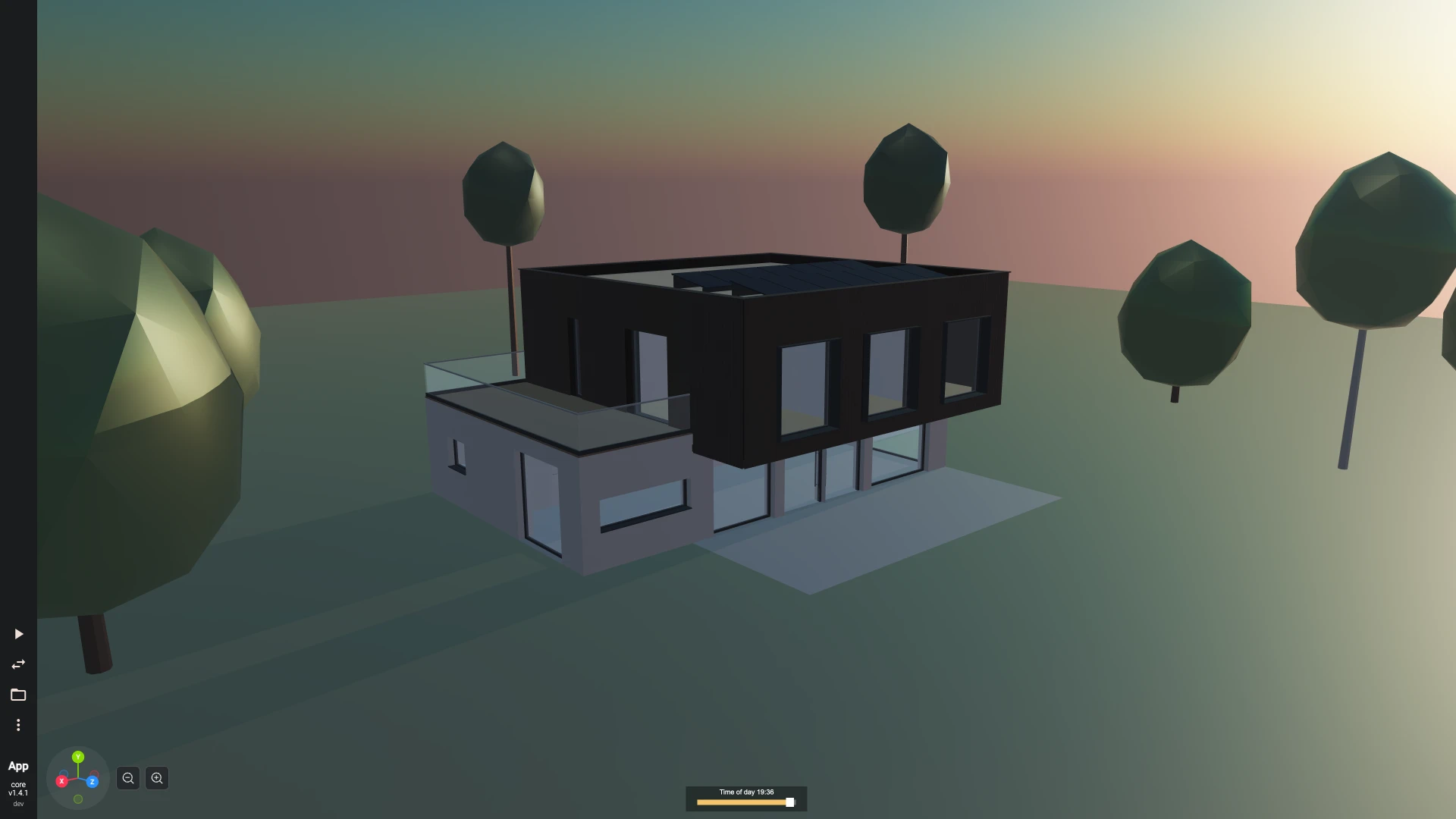
The vite/threejs/ifc-house example in the repository authors a modern family house for a cold climate this way: insulated rendered masonry below and a timber frame clad in charred larch boards above, cut around every opening and gathered into an assembly per facade, with a cantilever over the garden terrace and an insulated soffit under it, a warm flat roof behind a parapet with copings and a solar array on mounting rails, flashings, sills, window surrounds, downpipes, an entrance canopy, an oak stair with a steel stringer and balusters, a roof terrace, a carport, the garden's ground and trees, U-values on the envelope and thirteen rooms with their areas. It draws every element in its materials' colours, shows and hides each storey, labels the rooms, identifies a clicked element by its GlobalId, and downloads the file.
The same house runs in the TypeScript editor on bitbybit.dev as a family house in IFC, drawn under a sky whose sun follows a time-of-day slider:
Exact shapes and STEP
Manifold builds meshes, fast enough to draw large models. The OpenCascade kernel builds the same recipe exactly, with true circles and arcs, as shapes that measure, cut and fillet like any other and that export to STEP for fabricators. Start it beside the IFC worker (enableOCCT: true in initBitByBit):
const shapes = await bitbybit.ifc.geometry.toShapes({ model });
await bitbybit.draw.drawAnyAsync({ entity: shapes });

const step = await bitbybit.ifc.geometry.toStep({ model, name: "House", fileName: "house.step", tryDownload: true });
toShapes gives one shape per element, standing up along Y for drawing, and an element the kernel cannot build comes back empty rather than stopping the rest. toStep writes the file and gives back its bytes; toDocument gives the assembly document instead, to export to glTF or inspect, and to delete when done. All three describe the model in the IFC worker and build it in the OCCT worker, so both have to be enabled. To build a recipe you have already made, or one from another source, hand it to bitbybit.occt.recipes.build and bitbybit.occt.recipes.buildDocument directly.
A whole recipe builds in one kernel call, its steps in parallel on the multithreaded kernel; the example house's 738 elements take under a second. In the STEP file each element is a product named after it, its GlobalId and IFC type written as properties, and a door or window type placed many times is one part placed by each. The products are nested as the model is, so a CAD tool's tree reads like the model's:
House
  Site
    Building
      Ground floor
        Walls
        Windows
        ...
      First floor
        Walls
        Element assemblies
          South cladding
            Cladding board
            ...
    Geographic elements
The site, the building and each storey are assemblies, the elements of a storey are gathered by IFC class inside it (groupByClass: false leaves them in the storey directly), and the parts of a roof, an assembly or another element made of elements sit in an assembly of their own whole.
Elements a file stores as triangle meshes, as Revit exports its families, keep their triangles: they draw and measure, and the STEP file carries them as tessellated geometry (AP242). With facetedMeshes: true they become faceted solids instead, one per closed body with the triangles that share a plane merged into one face, which cut and fillet like any other shape but take longer and write larger files; a mesh a cut needs, such as a faceted wall with openings, is built that way regardless.
STEP is a verbose text format, and writing it holds the whole file in memory. A model with a million mesh triangles writes some 280 MB of STEP and needs about 2 GB while it does, which is all the standard 32-bit kernel has; export a model that large in parts, or on the 64-bit kernel, which has up to 16 GB.
What version 1 covers
- IFC4 (ADD2 TC1), read and written; a file read and written back keeps every unchanged entity character for character.
- A project, its site, one building, its storeys and the rooms and areas of each storey.
- Straight walls by thickness, layer set or wall type, joined at corners and T junctions, clipped under planes and roofs, read back and edited.
- Rectangular openings in walls and any outline through a slab; door and window types placed many times through shared geometry, each part (frame and glass, lining, panel and handle) in a material of its own; doors with lever or pull-bar handles.
- Slabs with holes; flat, mono-pitch, gable and hip roofs over a rectangle; columns, beams and members with rectangle, circle and I sections; assemblies of elements, such as a facade's cladding boards.
- The site around the building: terrain with holes where the building and paving meet it, and trees, as IFC geographic elements.
- Exact OpenCascade shapes of every element a model describes, and its STEP export, through
occt.recipes. - Materials with colours, layer sets, property sets set and removed value by value, any simple attribute, and the base quantities of every element it builds.