IFC building models: writing BIM with an agent
IFC is the open exchange format for building information models: storeys with the walls, slabs, doors and windows they contain, their materials, types, properties and quantities. Bitbybit writes IFC4 files that other BIM tools open as buildings, not as loose geometry. This page is written for agents as much as for people: the Bitbybit CAD MCP returns its sections through get_guide, and its describe and get_examples tools answer for every ifc method by its dotted path, such as ifc.walls.add. The IFC package page covers drawing and STEP export in more depth.
IFC models in Bitbybit
@bitbybit-dev/ifcis plain TypeScript. It needs no WebAssembly, no worker and no CAD kernel, so it runs in Node, in a serverless function and in the browser alike. It creates, reads, changes and writes models.- A building is made from standard elements. A wall keeps its axis, height and layers in the file, and its joins are recorded as IFC connections, so a tool that understands IFC edits it as a wall. The same is true of slabs, openings, doors and windows, roofs, columns, beams and members.
- Geometry is described, not built.
ifc.geometry.recipeturns a model into data a kernel builds: Manifold for fast meshes to draw, OpenCascade for exact shapes and STEP files. - The API is beta. Names and inputs may still change before the first stable version. Look every method up with
describerather than from memory. - It runs locally. Everything here is in the MIT npm packages; nothing about IFC needs CAD Cloud.
- Not yet. There is no stair element (a stairwell is an opening in a slab, and flights can be built from members), no curved wall or arched opening, and no building services (ducts, pipes, cables).
Two ways to call the IFC API
The methods have the same paths and the same inputs everywhere. What differs is how they answer.
-
In Node, or anywhere with the package alone, the methods are synchronous and a model is a value you hold:
import { IFC, IFCService } from "@bitbybit-dev/ifc";const ifc = new IFCService();let model = ifc.model.create({ name: "House", seed: "house-1" });model = ifc.spatial.addStorey({ model, id: "ground", name: "Ground floor", elevation: 0 });Run the TypeScript with
tsx(npx tsx house.ts): the package's own imports leave out file extensions, as bundlers expect, so plainnodecannot load them. Write the file withwriteFileSync("house.ifc", ifc.model.writeBytes({ model, fileName: "house.ifc" })). -
In the browser, through the renderer packages, and in scripts in the Bitbybit editors, the same methods run in the IFC worker as
bitbybit.ifc. Every call is asynchronous, and a model is a handle to the model the worker holds:let model = await bitbybit.ifc.model.create({ name: "House", seed: "house-1" });model = await bitbybit.ifc.spatial.addStorey({ model, id: "ground", name: "Ground floor", elevation: 0 });
describe shows the worker form: add(inputs: Inputs.IFC.AddWallDto<Inputs.IFC.IfcModelPointer>): Promise<Inputs.IFC.IfcModelPointer>. In Node read it as add(inputs: AddWallDto<IfcModel>): IfcModel. Enumerations are IFC.wallAlignmentEnum.left in Node and Bit.Inputs.IFC.wallAlignmentEnum.left in the editors; as plain values they are the enum's value, which is camelCase for the library's own enums ("left", "gable", "iShape") and IFC's own token for IFC's ("STANDARD", "USERDEFINED", "SINGLE_SWING_LEFT"). describe lists such an enum as one of standard = "STANDARD", solidWall = "SOLIDWALL", ...: the key you write after the enum's name, and the value it stands for; its default names the key. A method's answer also names the types it returns, such as Inputs.IFC.SpaceInfoDto for spaces.list; describe with that name lists their fields.
How the IFC API thinks
- A model is a value. Every method that changes a model returns a new one and leaves the one it was given as it was. Assign the result each time:
model = ifc.walls.add({ model, ... }). A call whose result is dropped changes nothing. - Your own ids. Give elements, storeys and types an
idsuch as"north-wall"and refer to them by it in later calls; the model derives each GlobalId from it.model.globalIdOfturns an id into its GlobalId. Ids must be unique in a model. - The same file every run. A
seedonmodel.createand a fixedtimeStamponmodel.writeormodel.writeBytesmake the same calls write the same bytes, so a change shows as a diff. - Units. Lengths are millimetres unless
model.createis given anotherlengthUnit(centimetre,metre). A length left out takes its default in the model's unit: a wall is 3000 mm high in a millimetre model and 3 m high in a metre one. Angles are in degrees. - Axes. IFC is Z up. Positions on a storey are its plan,
[x, y], and heights go up from the storey's floor; a storey'selevationsets where that floor is. Beams and members take[x, y, z]points in the same frame. Never swap Y and Z for a Y-up viewer in the model: drawing does that (adjustZtoY). - Outlines are lists of
[x, y]corners without the first repeated at the end. Either winding works for slabs, spaces and holes. - Layer order. A layer set lists its layers from a wall's right face, looking from its start to its end, so walls drawn counterclockwise around a plan list them outside first; a slab's and a roof's from the top down.
The order to write a building in
Later calls refer to what earlier calls made, so this order avoids every "not found" error:
- The model and its storeys:
model.create, thenspatial.addStoreyper floor with itselevation. - Materials and layer sets:
materials.add(a name, an optionalcolorsuch as"#b5651d"), thenmaterials.addLayerSetwithlayers: [{ material: "Brick", thickness: 235 }, { material: "Plaster", thickness: 15 }]. Walls, wall types, slabs and roofs refer to a layer set by its name; a layer set's thicknesses add up to the element's thickness. - Types:
walls.addType,doors.addTypeandwindows.addType. A door or window type is placed many times through shared geometry, so define each size once. - Walls:
walls.addper straight wall, fromstarttoend, with aheightand alayerSetor athickness.alignmentsays which side of the axis the layers lie on, looking fromstarttoend: walls drawn counterclockwise around a plan lie inside it withleftand outside withright, so withleftthe plan's corners are the building's outer faces. - Joins:
walls.connectfor every pair of walls that meet, at a corner or where one ends against another's side. Unjoined walls overlap or leave gaps at the corners. A wall that ends against another, such as a partition against an outside wall, may end anywhere within that wall's thickness: the join cuts it back to the face. - Doors, windows and openings:
doors.addandwindows.addplace a type in a walloffsetalong its axis from its start, and cut their own opening; do not add an opening for them as well.openings.addcuts an empty opening. A window'ssilldefaults to 900 mm above the wall's base, a door's to 0. Keep an opening at least the wall's thickness away from a mitred corner: the offset runs along the axis, and the face on the other side of a corner is shorter by the thickness. A door type'soperationnames its hinges as IFC does, seen from the wall's right side, its start on your left:singleSwingLeftis hinged toward the wall's start,singleSwingRighttoward its end, and the handle is on the other edge. - Slabs:
slabs.addwith anoutline,thicknessorlayerSetandtopOffsetabove the storey's floor;holesoropenings.addInSlabfor stairwells and shafts. A floor over a storey whose walls run up to it fits between their inner faces: an outline at the outer faces puts the slab and the top of the walls in the same space. - Roofs:
roofs.addover a rectangle of four corners (kind:flat,monoPitch,gable,hip), withbaseOffsetthe height of the walls under it and anoverhang. A mono-pitch roof rises from the outline's first side and a gable's ridge runs along it. Thenwalls.clipByRooffor each wall it covers. A wall under a slope is added taller thanbaseOffset, up to the ridge at most, and clipping cuts it to the slope, a gable wall to its triangle; a wall added exactly atbaseOffsetis left square, with a wedge open under the slope. - Structure and detail:
columns.add,beams.addandmembers.addwith aprofile(rectangle,circle,iShape);assemblies.addto group parts such as a facade's cladding boards. - Rooms:
spaces.addper room, with itsname(the room number),longNameandheight. - Data:
properties.addSet, such asPset_WallCommonwithIsExternal: trueshared by every outside wall. A property's value is written as a label, boolean, integer or real as it is, or as thetypeit names: any of IFC4'sIfcValuetypes, such asIfcText,IfcLengthMeasureorIfcThermalTransmittanceMeasurefor a U-value. - Quantities last:
quantities.computemeasures every element as it is now; compute again after any later change. - Write:
model.writeBytes(any size) ormodel.write(the text).
A house to start from
A family house in IFC shows where this order leads: a whole two-storey house written with the same calls, which opens in the TypeScript editor.
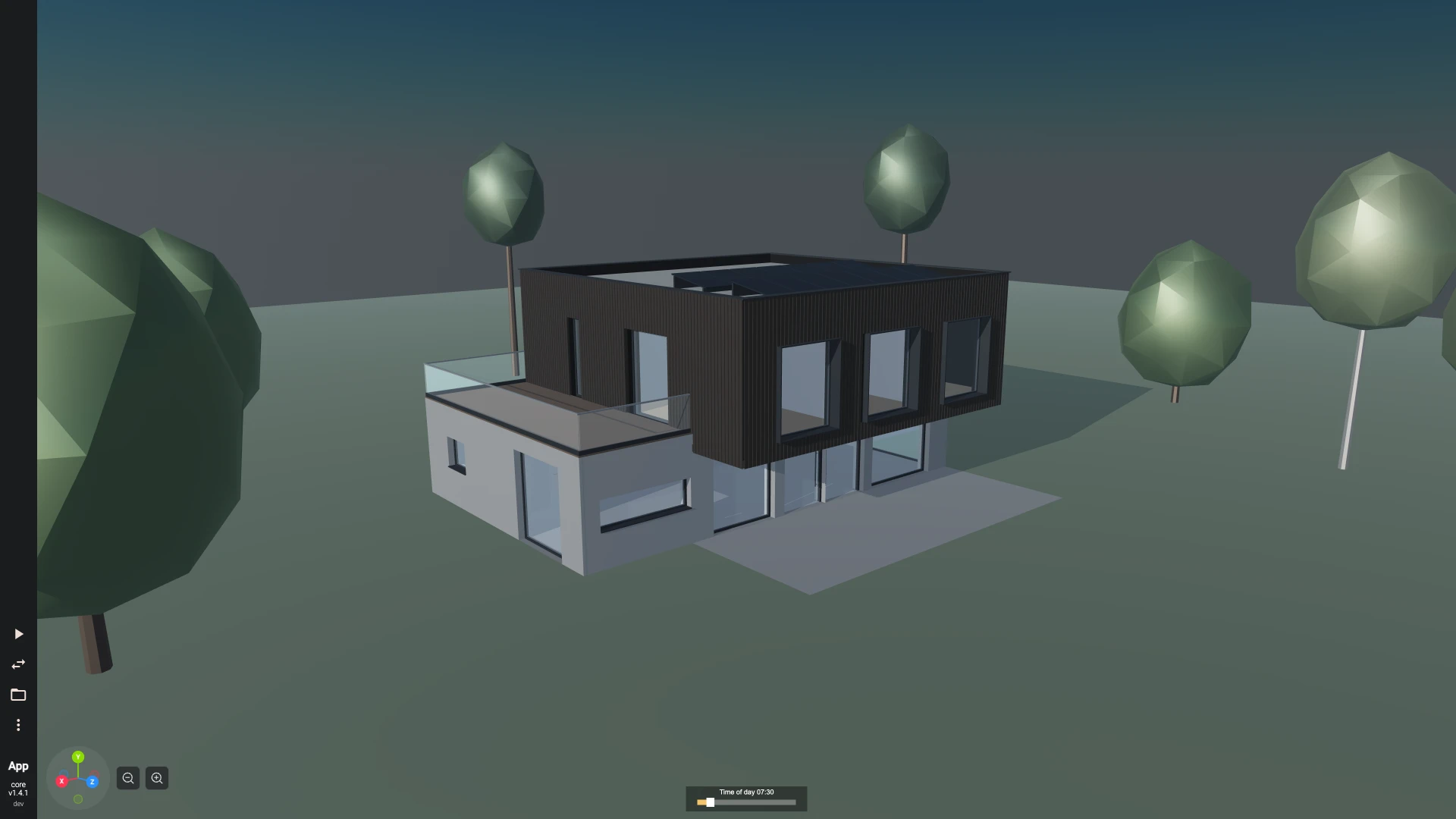
A two-storey house in Node, with the package alone. It follows the order above and writes a file other BIM tools open:
import { writeFileSync } from "node:fs";
import { Base, IFC, IFCService } from "@bitbybit-dev/ifc";

const FOOTPRINT: Base.Point2[] = [[0, 0], [10000, 0], [10000, 8000], [0, 8000]];
const INSIDE: Base.Point2[] = [[250, 250], [9750, 250], [9750, 7750], [250, 7750]];
const STOREY_HEIGHT = 3000;
const STOREYS = ["ground", "first"];

const ifc = new IFCService();
let model = ifc.model.create({ name: "House", seed: "house-1" });
model = ifc.spatial.addStorey({ model, id: "ground", name: "Ground floor", elevation: 0 });
model = ifc.spatial.addStorey({ model, id: "first", name: "First floor", elevation: STOREY_HEIGHT });

model = ifc.materials.add({ model, name: "Brick", category: "brick", color: "#b5651d" });
model = ifc.materials.add({ model, name: "Plaster", category: "plaster", color: "#f2efe6" });
model = ifc.materials.add({ model, name: "Concrete", category: "concrete", color: "#9a9a9a" });
model = ifc.materials.add({ model, name: "Tiles", category: "tile", color: "#7a2e1d" });
model = ifc.materials.addLayerSet({ model, name: "Exterior wall", layers: [{ material: "Brick", thickness: 235 }, { material: "Plaster", thickness: 15 }] });
model = ifc.materials.addLayerSet({ model, name: "Floor", layers: [{ material: "Concrete", thickness: 200 }] });
model = ifc.materials.addLayerSet({ model, name: "Roof", layers: [{ material: "Tiles", thickness: 220 }] });
model = ifc.doors.addType({ model, id: "door", name: "Door 900", width: 900, height: 2100 });
model = ifc.windows.addType({ model, id: "window", name: "Window 1200", width: 1200, height: 1400 });

for (const storey of STOREYS) {
    for (let i = 0; i < FOOTPRINT.length; i++) {
        const underRoof = i % 2 === 1 ? 6500 : 3400;
        model = ifc.walls.add({
            model, storey, id: `${storey}-wall-${i}`, start: FOOTPRINT[i], end: FOOTPRINT[(i + 1) % FOOTPRINT.length],
            height: storey === "first" ? underRoof : STOREY_HEIGHT, layerSet: "Exterior wall", alignment: IFC.wallAlignmentEnum.left,
        });
    }
    for (let i = 0; i < FOOTPRINT.length; i++) {
        model = ifc.walls.connect({ model, wall: `${storey}-wall-${i}`, other: `${storey}-wall-${(i + 1) % FOOTPRINT.length}` });
    }
    model = ifc.slabs.add({ model, storey, id: `${storey}-floor`, outline: storey === "ground" ? FOOTPRINT : INSIDE, layerSet: "Floor" });
    model = ifc.windows.add({ model, wall: `${storey}-wall-2`, windowType: "window", offset: 3000 });
    model = ifc.properties.addSet({
        model, elements: FOOTPRINT.map((_, i) => `${storey}-wall-${i}`), name: "Pset_WallCommon",
        properties: [{ name: "IsExternal", value: true }, { name: "LoadBearing", value: true }],
    });
}
model = ifc.doors.add({ model, wall: "ground-wall-0", doorType: "door", id: "front-door", offset: 4500 });
model = ifc.openings.addInSlab({ model, slab: "first-floor", id: "stairwell", outline: [[7000, 5000], [9750, 5000], [9750, 6200], [7000, 6200]] });
model = ifc.roofs.add({ model, storey: "first", id: "roof", outline: FOOTPRINT, kind: IFC.roofKindEnum.gable, pitch: 35, baseOffset: STOREY_HEIGHT, overhang: 400, layerSet: "Roof" });
for (let i = 0; i < FOOTPRINT.length; i++) {
    model = ifc.walls.clipByRoof({ model, wall: `first-wall-${i}`, roof: "roof" });
}
model = ifc.spaces.add({ model, storey: "ground", id: "living", name: "0.01", longName: "Living room", outline: [[250, 250], [9750, 250], [9750, 7750], [250, 7750]], height: 2700 });
model = ifc.quantities.compute({ model });

writeFileSync("house.ifc", ifc.model.writeBytes({ model, fileName: "house.ifc", timeStamp: "2026-01-01T12:00:00" }));
The walls run counterclockwise with left alignment, so they stand inside the footprint and their layers are listed outside first: brick, then plaster. The ground floor's slab lies under the walls and the first floor's between their inner faces (INSIDE), so no slab cuts into a wall. The gable's ridge runs along the outline's first side, so the short walls (wall-1 and wall-3) are the gables: they are added 6.5 m high and clipped to the roof's triangle, and the long walls are added 3.4 m high and clipped to the slope, so the roof meets every wall without a gap. Each storey's windows, door and stairwell refer to walls and slabs by the ids they were given.
Checking an IFC model
Read the model back before handing it over; every check here is cheap:
model.summarygives the schema, whether the model can be changed, its length unit asmillimetresPerUnit, the storeys and how many elements of each type there are (elementCounts). Compare the counts with what the prompt asked for: rooms are not among them (count them withspaces.list), and a sloping roof's planes areIfcSlabparts of itsIfcRoof, so they count as slabs too.geometry.unsupportedlists every element whose geometry cannot be described, with the reason. It should be empty for a model made with these methods.walls.parametersreads one wall back: its axis, height, thickness and layers, the walls it is joined to, its openings and its clippings. A corner missing fromjoinsis awalls.connectthat was forgotten; a join names the other wall by its GlobalId, whichmodel.globalIdOfgives for an id of your own.spaces.listgives every room with its area, in the model's length unit squared (square millimetres in a millimetre model).quantities.getgives an element's measured quantities afterquantities.compute, as IFC's base quantities are written: lengths in the model's unit, areas in square metres and volumes in cubic metres.- A method refuses what it cannot do and says why, before anything changes: an opening wider than its wall, a door type that was never added, a wall id used twice. Read the message, fix the call and run the script again.
- Where Python with IfcOpenShell is available, its validator checks the file against the IFC4 schema and its rules:
python -m ifcopenshell.validate --rules house.ifc. A file made with these methods passes it.
Reading and changing IFC files
model.readtakes the text or the bytes of an.ifcfile, such asreadFileSync("in.ifc")orawait file.arrayBuffer(). It indexes the file without decoding it, so files of hundreds of megabytes open in seconds.model.elementslists objects by IFC type, its subtypes included (IfcWall,IfcBuildingElement, orIfcElementfor every element), optionally of one storey;model.elementdescribes one;model.getAttributeandmodel.setAttributeread and set one attribute such asNameorTag.properties.getSetsreads an object's property sets;properties.setValueschanges one object's values, copying a set it shares with others first, so the others keep theirs.walls.parametersandwalls.editread and change walls other tools wrote with an axis and layers; joined walls are trimmed again and the wall's openings move with it.model.movemoves and turns any element, andmodel.removetakes it away with what only it uses.- IFC2X3 files are read, queried and written back, but not changed:
model.upgradeToIfc4gives a model that can be. model.writeByteswrites untouched entities back byte for byte, so a small change to a large file stays small. Prefer it tomodel.writefor files read from elsewhere: a JavaScript string holds about 512 MB.
Drawing an IFC model and exporting STEP
In the browser, a model's recipe is built by a kernel and drawn:
const recipe = await bitbybit.ifc.geometry.recipe({ model });
const solids = await bitbybit.manifold.recipes.build({ recipe, adjustZtoY: true });
await bitbybit.draw.drawAnyAsync({ entity: solids });
The solids come back one per root of the recipe, and recipe.roots[i].tag carries the element's globalId, type, name and, when its material has a colour, rgba. With the OpenCascade worker enabled as well, ifc.geometry.toShapes gives exact shapes and ifc.geometry.toStep the bytes of a STEP file, nested by site, building, storey and IFC class: await bitbybit.ifc.geometry.toStep({ model, name: "House", fileName: "house.step" }). A Babylon.js scene is left-handed unless told otherwise; set scene.useRightHandedSystem = true before drawing, or the building is mirrored.
Mistakes to avoid in IFC models
- Dropping the returned model.
ifc.walls.add({ model, ... })withoutmodel =changes nothing; the next call starts from the model before it. - Mixing the two call forms. In Node the package's methods are synchronous;
bitbybit.ifcin the browser and in the editors is asynchronous and needsawaiton every call. - Guessed units. A wall
height: 3in a millimetre model is 3 mm high. Give lengths in the model's unit, millimetres unless the model says otherwise. - Y as up. Plans are
[x, y]and up is Z. A point written as[x, height, y]puts the building on its side. - Unjoined walls. Every corner and T junction needs
walls.connect. Without it the walls overlap or leave a gap there, and other BIM tools show them as walls that do not meet. - An opening for a door or window.
doors.addandwindows.addcut their own; an extraopenings.addin the same place is a second hole. - Openings that do not fit. An opening past the end of its wall is refused, but two that overlap, or one whose
sillplus height rises above the wall, are not: keep the openings of a wall apart and under its top. - The roof before its walls are clipped, or a roof that is not a rectangle.
roofs.addtakes four corners, and walls are clipped withwalls.clipByRoofafter the roof exists. - Quantities computed too early. They are a snapshot; compute them once the model is finished, or again after a change.
- An assembly of a user-defined kind without words.
assemblies.addwithpredefinedTypeuserDefinedneeds anobjectTypethat says what it is, such as"Cladding". - Changing an IFC2X3 model. It refuses every change until
model.upgradeToIfc4. - Fields that do not exist. Look each method up with
describe; its inputs, defaults and ranges come from the index, not from memory.