The "BITBYBIT RUNNER" Block for Shopify
The theme editor lists it as BITBYBIT RUNNER (legacy) and shows this note at the top of its settings:
Deprecated - this block keeps working for existing setups, but the recommended path is linking scripts inside a Composer project in the 3D Bits admin and publishing the project to your products.
Nothing you have already built stops working. Do not start anything new here.
The BITBYBIT RUNNER is a theme app extension block provided by our "3D Bits" Shopify app. You paste a script exported from a Bitbybit editor into the block, and link it to your Shopify product variants and custom line item properties, so a parametric model recalculates as a shopper changes their options.
It predates the app's own project workflow, and that is the thing that replaced it.
What to build instead
Write the same parametric program as a Script in the 3D Bits admin, then link that script into a Composer project's Scripting section and publish the project to your products. The geometry is calculated exactly the same way, and you get everything the block never had around it: an option panel you design rather than borrow from the theme, computed pricing that is verified at checkout, project versions you can restore, and publishing that puts the result on every linked product without you editing a template.
Scripts explains the three ways to write one, and Scripting covers linking one into a project. Scripts need the Standard or Pro plan.
If your product does not actually need calculated geometry, you probably do not need a script at all. Most configurators swap between models you prepared in advance, which is faster and needs no code. See Composer.
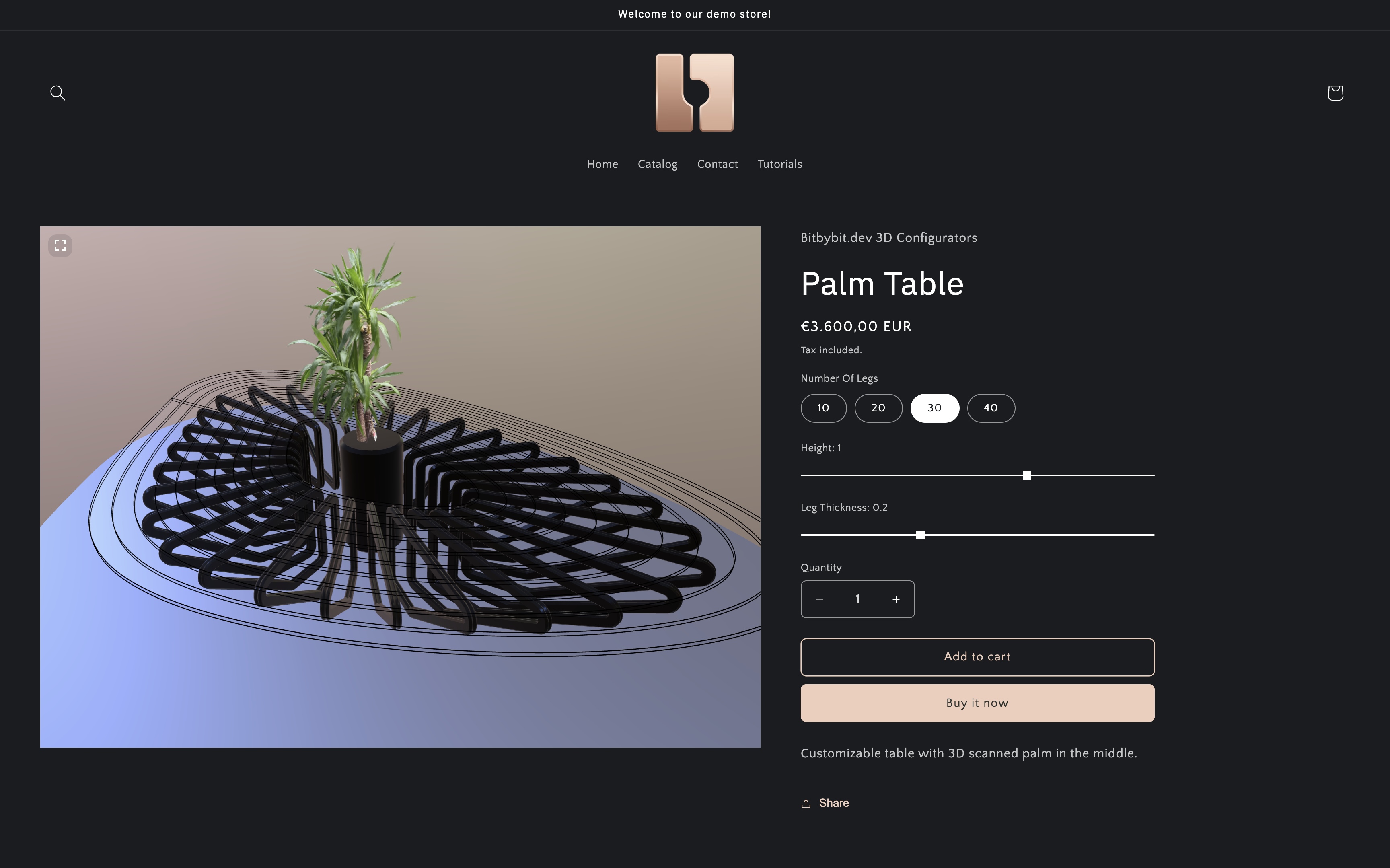 Example of a customisable product page with a 3D table, where the RUNNER block is being used.
How Does the BITBYBIT RUNNER Block Work?
This is here so that an existing setup remains maintainable. The principle is straightforward:
- Create your script: Design and code your parametric 3D model or interactive experience using one of the editors (Rete, Blockly, or TypeScript) on the bitbybit.dev platform.
- Export your script: Use the "Export to Runner" feature within the Bitbybit editor to generate JavaScript code from your visual or TypeScript program.
- Integrate in Shopify: Copy this exported JavaScript code and paste it into the Inline Script field within the BITBYBIT RUNNER block settings in your Shopify theme editor.
- Link inputs: Configure the block to link Shopify product variants or custom line item properties to specific input parameters defined in your script.
The block listens for changes to input values on the page, such as variant dropdowns or custom fields, and passes them to your script, which adapts the 3D model in response.
The block's own settings are documented under Block Settings, and the settings it shares with the other blocks under Common Settings.
The other blocks
If you are looking at the RUNNER block because you inherited one, these are the alternatives worth knowing about:
- BITBYBIT VIEWER: displays one or more prepared 3D models on your product page, with no scripting at all.
- BITBYBIT PREVIEW: embeds a publicly available script from the Bitbybit platform as a showcase, without wiring it to product options.
- The app embed: places a published project on every linked product page for you, with no template editing.
Older walkthroughs that use this block are still available on our tutorials pages. If a legacy setup needs work and you would rather not do it yourself, get in touch - we take on this kind of migration as a paid project.