A batch of variants in one pipeline
A table of three bracket sizes, each with how many to cut, goes in; one pipeline models every size, unfolds it and nests all of them with their own quantities on one sheet. The sheets come back as STEP and the layout as JSON. It builds on From a parametric bracket to a cut file.
What you need
The same as the first tutorial: a CAD Cloud API key in BITBYBIT_API_KEY, Node.js 22.18 or newer, and a folder
with @bitbybit-dev/cad-cloud-sdk installed and "type": "module" in its package.json.
The script
Save it as bracket-batch.ts and run node bracket-batch.ts.
import { writeFileSync } from "node:fs";
import { BitbybitClient } from "@bitbybit-dev/cad-cloud-sdk";

const apiKey = process.env["BITBYBIT_API_KEY"];
if (!apiKey) throw new Error("Set BITBYBIT_API_KEY to your CAD Cloud API key");
const baseUrl = process.env["BITBYBIT_API_URL"];
const client = new BitbybitClient(baseUrl ? { apiKey, baseUrl } : { apiKey });

const sizes = [
    { legA: 40, legB: 30, width: 20, quantity: 12 },
    { legA: 60, legB: 40, width: 30, quantity: 8 },
    { legA: 80, legB: 50, width: 40, quantity: 4 },
];
const bendRadius = 4;
const stepsPerSize = 12;

const { downloads } = await client.cad.pipelineAndPoll({
    steps: [
        {
            type: "map",
            items: sizes.map((size) => ({
                points: [[0, 0, 0], [size.legA, 0, 0], [size.legA, size.legB, 0]],
                width: size.width,
                holeInLegA: [(size.legA - bendRadius) / 2, 0, 0],
                holeInLegB: [size.legA, (size.legB + bendRadius) / 2, 0],
            })),
            steps: [
                { operation: "json.getValueOnProp", params: { json: "$item", property: "points" } },
                { operation: "occt.shapes.wire.createPolylineWire", params: { points: "$local:0" } },
                { operation: "occt.fillets.fillet2d", params: { shape: "$local:1", radius: bendRadius } },
                { operation: "json.getValueOnProp", params: { json: "$item", property: "width" } },
                { operation: "occt.shapes.wire.createRectangleWire", params: { width: 2, length: "$local:3", center: [0, 0, 0], direction: [1, 0, 0] } },
                { operation: "occt.operations.pipe", params: { shape: "$local:2", shapes: ["$local:4"] } },
                { operation: "json.getValueOnProp", params: { json: "$item", property: "holeInLegA" } },
                { operation: "occt.shapes.solid.createCylinder", params: { radius: 3, height: 10, center: "$local:6", direction: [0, 1, 0], originOnCenter: true } },
                { operation: "json.getValueOnProp", params: { json: "$item", property: "holeInLegB" } },
                { operation: "occt.shapes.solid.createCylinder", params: { radius: 3, height: 10, center: "$local:8", direction: [1, 0, 0], originOnCenter: true } },
                { operation: "occt.booleans.difference", params: { shape: "$local:5", shapes: ["$local:7", "$local:9"], keepEdges: false } },
                { operation: "occtPro.sheetMetal.unfoldSolidToFlat", params: { shape: "$local:10", kFactor: 0.44, thicknessOverride: 0 } },
            ],
        },
        {
            operation: "occtPro.nesting.nest",
            params: {
                shapes: `$ref:${String(sizes.length * stepsPerSize)}`,
                options: { sheets: [{ width: 400, height: 300 }], parts: sizes.map((size) => ({ quantity: size.quantity })), spacing: 4, margin: 5, seed: 1, evaluationBudget: 30000 },
            },
        },
    ],
    outputs: { formats: ["step", "json"] },
});

const names: Readonly<Record<string, string>> = { step: "nested-sheets.step", result: "layout.json" };
for (const download of downloads) {
    const name = names[download.format];
    if (name === undefined) continue;
    writeFileSync(name, Buffer.from(await (await fetch(download.downloadUrl)).arrayBuffer()));
    console.log(`saved ${name}`);
}
It saves layout.json and nested-sheets.step.
How it works
Map repeats the steps for every size
A map step runs its own steps once for each entry of items. Each item here is one size, written the way the steps
need it: the path's three points, the bracket's width and the centres of its two holes, worked out from its legs.
Inside the map:
$itemis the current size, andjson.getValueOnPropreads each of those from it;$local:Nis the result of step N of the same round, counting from 0;- the last step,
occtPro.sheetMetal.unfoldSolidToFlat, flattens the bracket, so the map's result is the list of flat patterns, one per size.
The steps are the first tutorial's, holes included. Every step run inside a map takes its own place in the
pipeline's list of results, so the map's own result comes after all of them: three sizes of twelve steps put it at
$ref:36, which the script works out as sizes.length * stepsPerSize.
One nest for every size
occtPro.nesting.nest takes the list of flats as its shapes, and options.parts gives each one its quantity, in the
order of the table: 12 of the small bracket, 8 of the middle one and 4 of the large one, on a 400 x 300 mm sheet. As
in the first tutorial, seed and evaluationBudget make the layout the same on every run.
What comes back
The pipeline returns its last result in the formats asked for: step writes the nested sheets, each flat in its
place, and json writes the layout report. Each download names its format, which is how the script tells them
apart; the task's own metadata comes too, and the script leaves it.
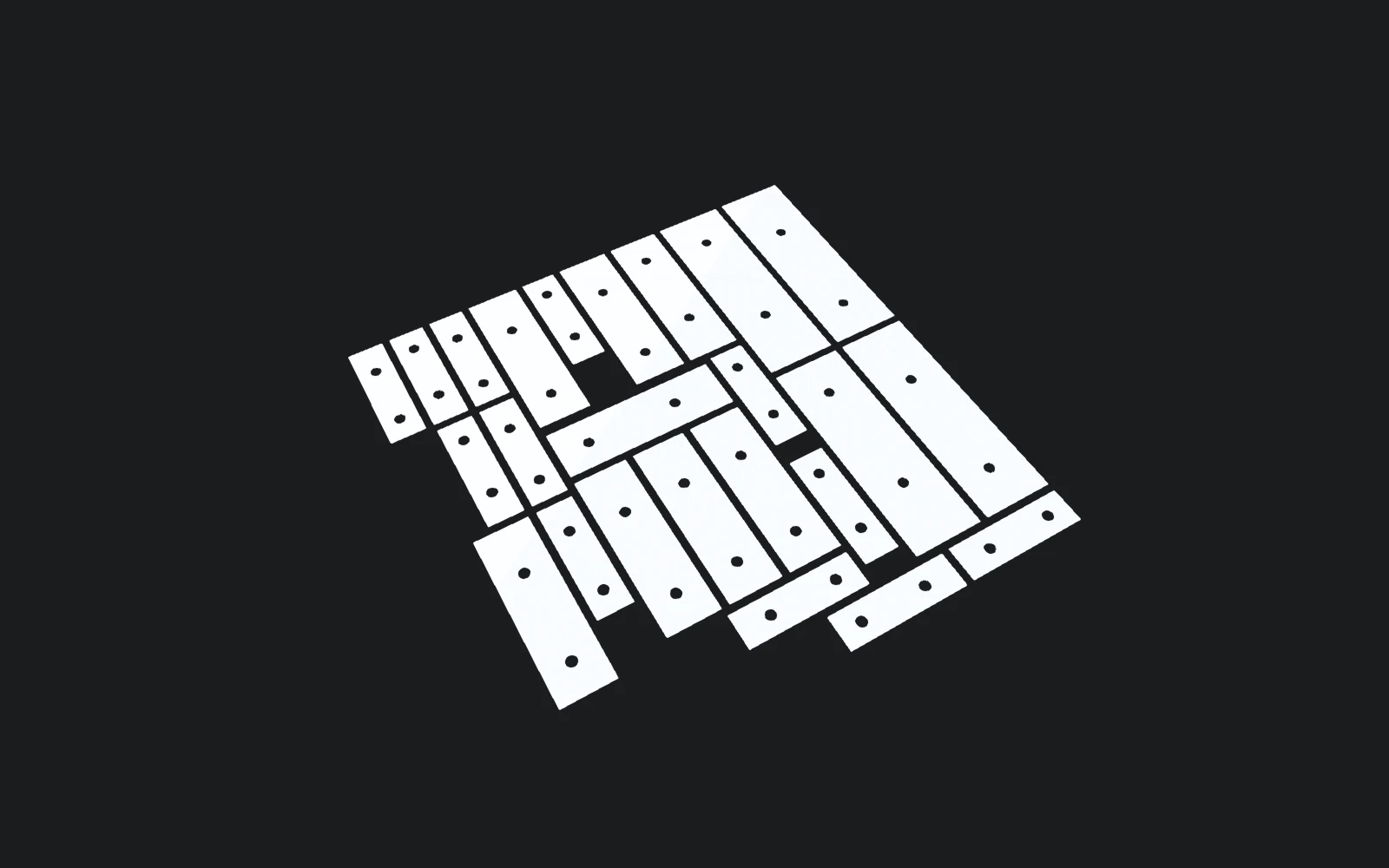
The report places all 24 brackets on one sheet: 12, 8 and 4 of the three sizes, each flat with its outline and its two holes.
Cut files
A pipeline gives the nested sheets as STEP, which CAM programs import. For a DXF or SVG cut file, send the brackets to the unfold-and-nest route as the first tutorial does. That route unfolds every solid in the STEP file it is given, so one file can hold every size, but it places the same number of copies of each; this pipeline is the way to give each size its own.