Sheet-metal unfold
Send a STEP file of bent sheet-metal parts and get back what a cutting machine needs: each part's flat pattern, every bend measured, and, if you ask, the flats nested on sheets as a DXF or SVG drawing. It is one of the Pro algorithms that run only on CAD Cloud.
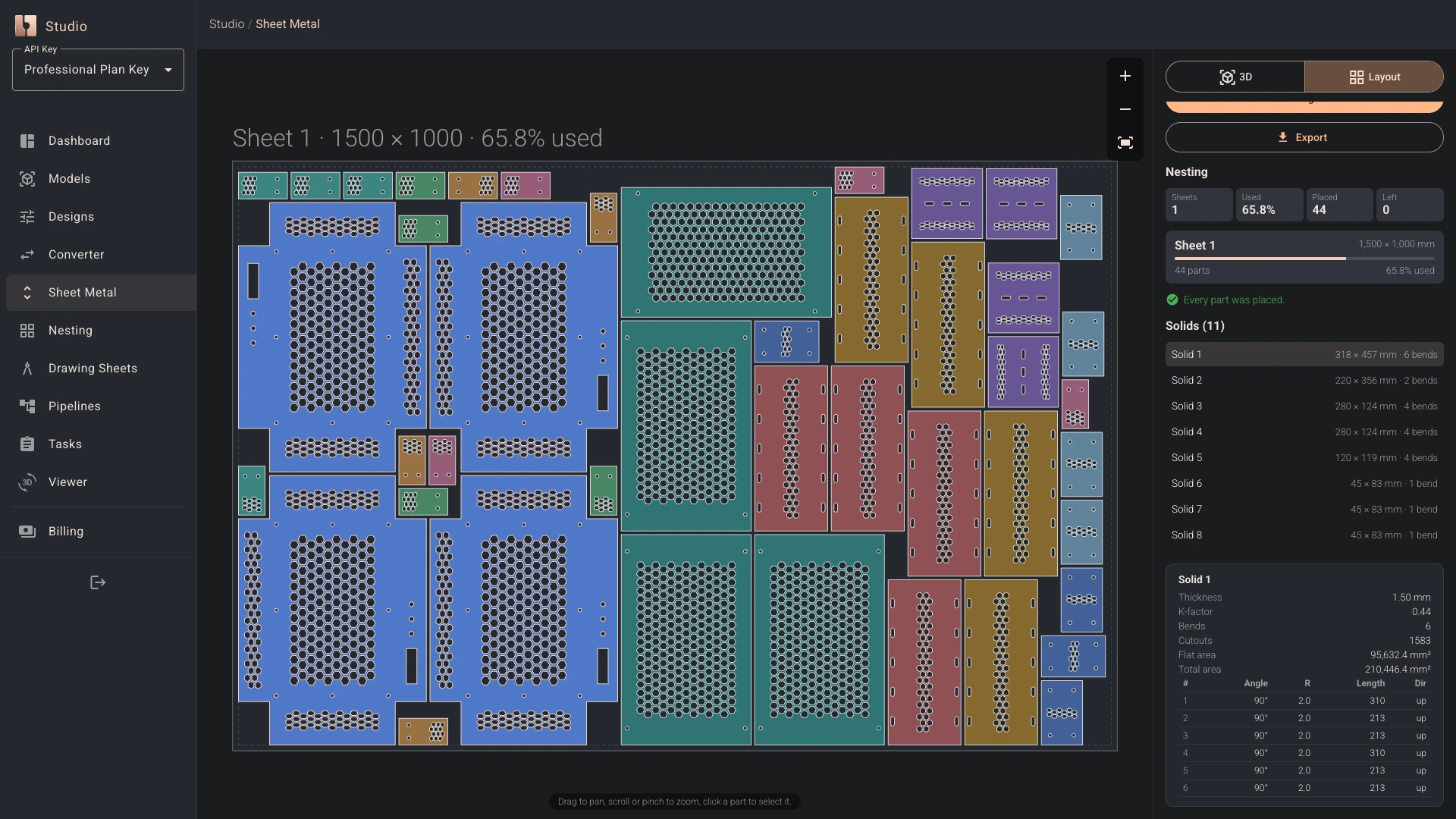
The picture is the vented enclosure kit from the input templates: eleven parts of 1.5 mm sheet, four kits' worth, unfolded and nested on one 1500 x 1000 mm sheet in a single call.
Download the vented enclosure kit template, a compressed STEP file (5.4 MB) Download every sheet-metal template, each with its request and the scripts that run it (5.3 MB)What it unfolds
Every solid in the file is unfolded on its own, so a file can hold a whole kit of parts. A solid unfolds when it is sheet metal: one constant thickness throughout, with its bends either rounded (a cylinder or cone face between two flanges) or sharp (two flanges meeting on an edge). Holes, slots and cut-outs come through to the flat pattern.
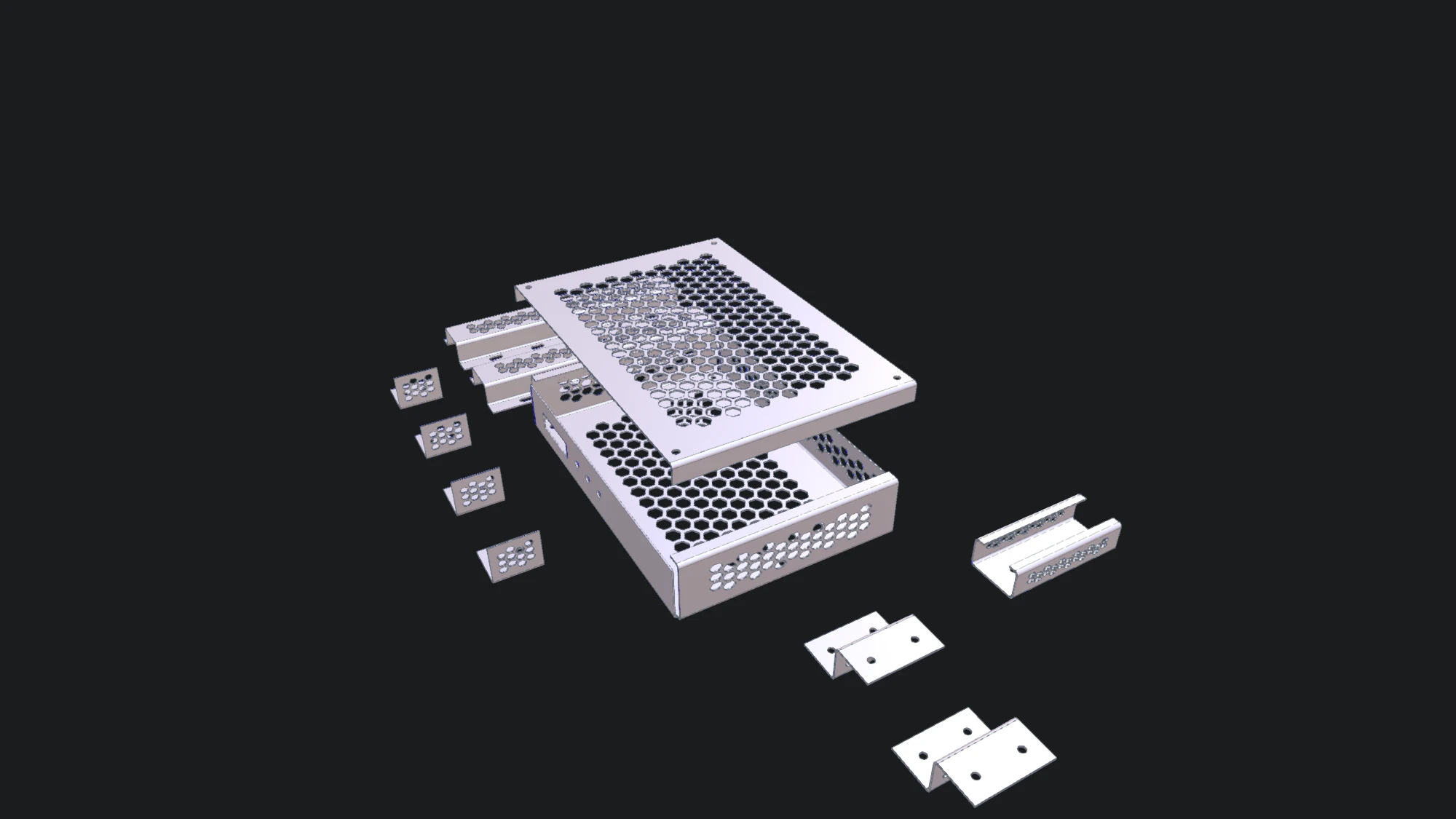
The enclosure kit up close in the 3D view: the chassis, the lid, the rails and the brackets, each one sheet of 1.5 mm with every vent hole cut through.
The thickness is found from the solid's faces. If a part is modelled with a slightly uneven wall, set
thicknessOverride to the sheet's thickness in millimetres instead.
The kFactor places the neutral axis inside each bend, from 0 at the inner face to 1 at the outer one, and so sets how
long each flat comes out. It defaults to 0.5; use your shop's value for the material and the tooling. The enclosure kit's
request uses 0.44.
In Studio
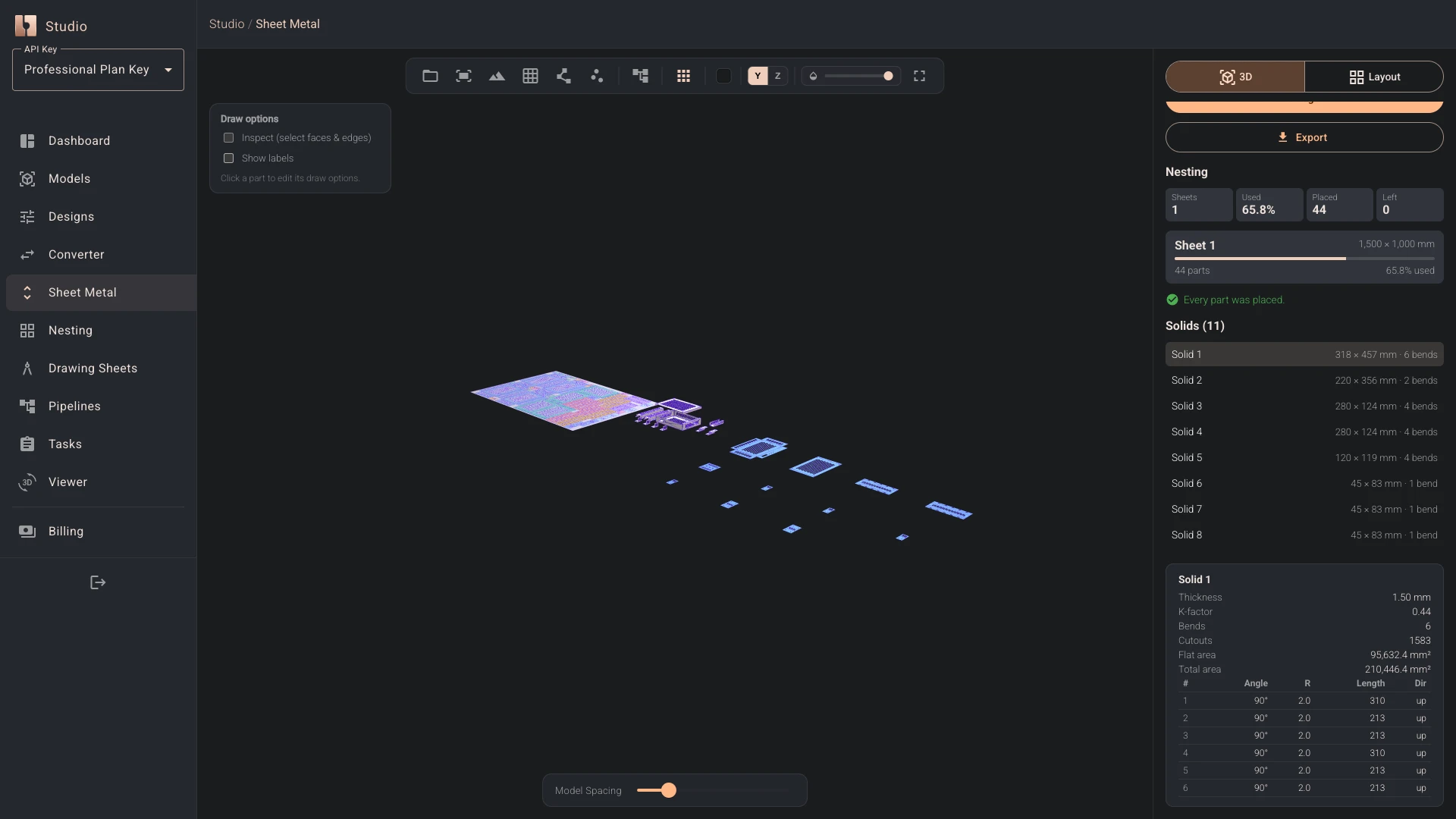
- Open Sheet Metal and drop a STEP file on it, or choose Start from a template and Vented enclosure kit.
- Check the K-factor and the Thickness. With Nest on sheets on, set the sheet, the gaps, the Copies of every part, how long the nesting may search, Time (s), and the unit the DXF and SVG are written in, Cut files in.
- Choose Unfold and nest.
The 3D view shows the folded parts beside their flat patterns and the nested sheet. Pick a part in the list to see its thickness, k-factor and every bend: its angle, inner radius, length and direction. Layout shows the nested sheets flat, and Export downloads the drawings and the reports.
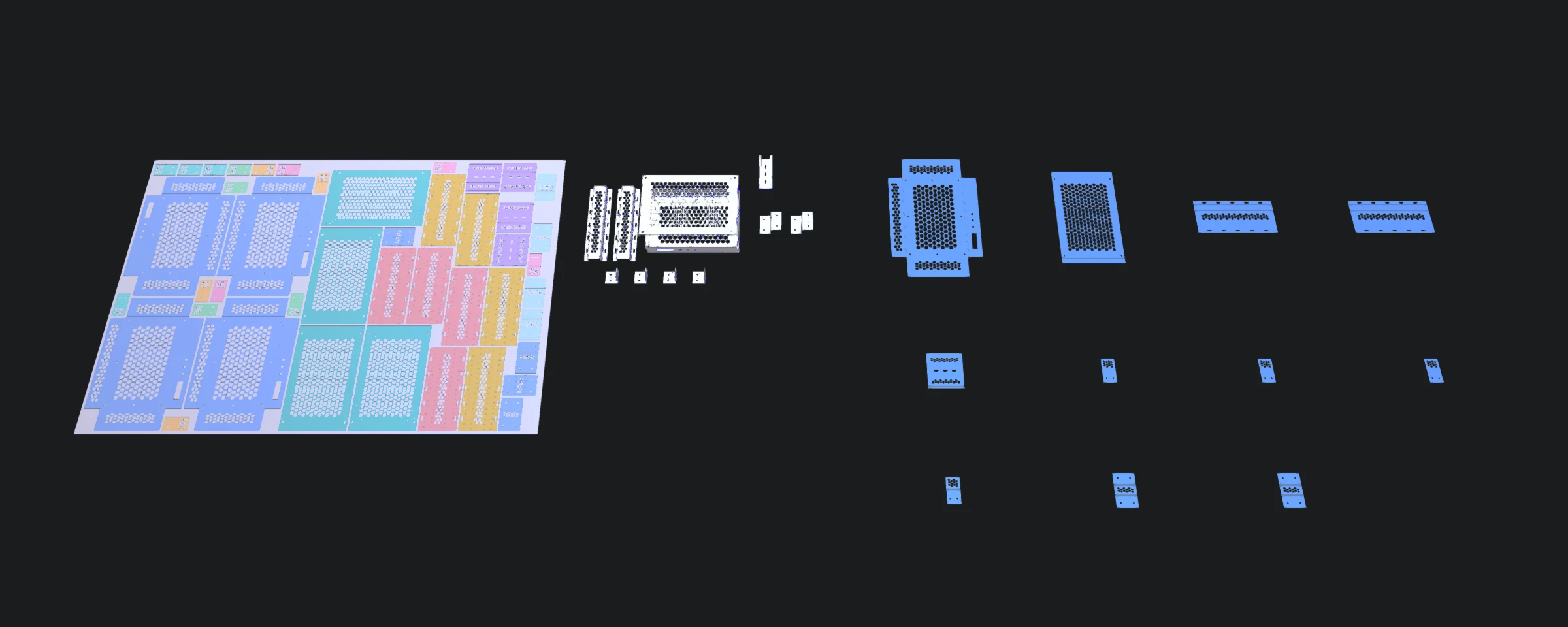
The same result from higher up: four kits' flat patterns nested on the sheet, the folded kit beside it, and each part's flat pattern on its own.
The routes
Every route takes one uploaded STEP file (.step, .stp, or gzip-compressed .stpz) as stepFileId, starts a task
and answers with its taskId, like every CAD Cloud call.
| Route | What it returns |
|---|---|
POST /api/v1/cad/pro/unfold/solid-and-nest | The unfold report, the nesting report and the nested sheets, in one call |
POST /api/v1/cad/pro/unfold/solid | Every solid's flat pattern and the unfold report |
POST /api/v1/cad/pro/unfold/solid-to-flat | Every solid's flat pattern |
POST /api/v1/cad/pro/unfold/solid-report | The unfold report alone |
POST /api/v1/cad/pro/unfold/face-to-flat | One developable face of the file, flattened (faceIndex) |
POST /api/v1/cad/pro/unfold/face-report | That face's surface type and its area before and after |
The routes need an API key with the cad scope.
Unfold and nest in one call
This is the request the enclosure kit ships with. <your uploaded file> stands for the fileId the upload gave you.
{
    "stepFileId": "<your uploaded file>",
    "kFactor": 0.44,
    "thicknessOverride": 1.5,
    "nesting": {
        "quantity": 4,
        "sheets": [{ "width": 1500, "height": 1000 }],
        "spacing": 6,
        "margin": 10,
        "seed": 1,
        "evaluationBudget": 1500000,
        "timeBudgetSeconds": 120
    },
    "outputs": { "formats": ["dxf", "svg", "outlines"] }
}
nesting.quantityis how many of the model to make: every flat pattern is placed that many times.- Left out,
nesting.sheetsis sized for the flats: one kind of sheet at least twice as long as it is wide, large enough that the flats fill about half of it. When every flat fits on standard 3000 x 1500 stock and the sized sheet would be larger, the standard stock is used. spacingandmargindefault to a gap sized to the flats. Flats turn in quarter turns unlessrotationssays otherwise, and turn over only withallowFlip.- The search stops at
timeBudgetSeconds(5 by default here, at most 120) and returns the best layout found by then.evaluationBudgetstops it after that many tries instead, so the sameseedgives the same layout every time.
The other nesting options, stock of several sizes or a strip of open length among them, are on the Nesting page.
Outputs
outputs.formats takes one or more of:
| Format | What you get |
|---|---|
dxf | An AutoCAD 2000 drawing in millimetres, or in outputs.unit: the sheets' outlines on layer SHEETS, the parts' cut paths on layer PARTS, every arc, ellipse and spline exact |
svg | The same drawing as an SVG file in the same unit, each layer a group |
outlines | The same cut paths as JSON, in millimetres, each copy in its sheet's frame and named by its placement |
step or stpz | The nested sheets as STEP, each sheet one part holding its placed flats |
gltf | The nested sheets as glTF, the default |
decomposed-mesh | The placed parts triangulated, as JSON |
flat-meshes | Each solid's flat pattern triangulated where it was unfolded, for showing beside the model |
Give step or stpz, not both. A dxf or svg too large to write is left out while every other format is still
written, and the task's metadata says why under outputsLeftOut.
outputs.unit writes the DXF and SVG cut files in mm (the default), cm, m or in: "unit": "in" gives an inch
DXF, its header saying so, and an SVG whose width and height are in inches. It changes those two files only. STEP stays in
millimetres, since a STEP file states its unit and CAD programs convert it on import; gltf, decomposed-mesh and
flat-meshes are written as without it; the outlines, both reports and every length in the request stay in
millimetres. Nesting has the details.
The routes without nesting write the flat patterns themselves, as gltf (the default), step, stpz or
decomposed-mesh; each solid's flat is one part, named flat-1, flat-2 and so on after the solid it came from.
The unfold report
The report has one entry per solid, in the file's order, each carrying its solidIndex:
- the thickness found (or given), the k-factor and the flat pattern's area against the part's total area;
- every bend: where its line runs, its angle, its inner, outer and neutral radius and its developed length;
- every face of the solid with the role it played: one side of the sheet or the other, the rim along its edges, a bend, or the wall of a cut-out.
A solid that cannot be unfolded gets ok: false with the reason, and the diagnostics gathered before it stopped, while
the other solids are unfolded as usual.
Run it
The template download holds this request with two scripts that send it: run.sh (curl and jq) and
run.ts (the TypeScript SDK). Each uploads the file, sends the request, waits for the task and saves every result
beside it. With the SDK, the call is:
import { readFileSync } from "node:fs";
import { BitbybitClient, unwrap } from "@bitbybit-dev/cad-cloud-sdk";

const client = new BitbybitClient({ apiKey: process.env["BITBYBIT_API_KEY"] ?? "" });
const name = "sheet-metal-enclosure-kit.stpz";
const file = await client.files.uploadBytes(name, readFileSync(name), "application/octet-stream");
const { taskId } = await unwrap<{ taskId: string }>(await client.request("POST", "/api/v1/cad/pro/unfold/solid-and-nest", {
    stepFileId: file.fileId,
    kFactor: 0.44,
    nesting: { quantity: 4, sheets: [{ width: 1500, height: 1000 }] },
    outputs: { formats: ["dxf", "svg"] },
}));
const { downloads } = await client.tasks.pollAndDownload(taskId, { intervalMs: 2000, maxAttempts: 600 });
Every request option is in the API reference.