From a parametric bracket to a cut file
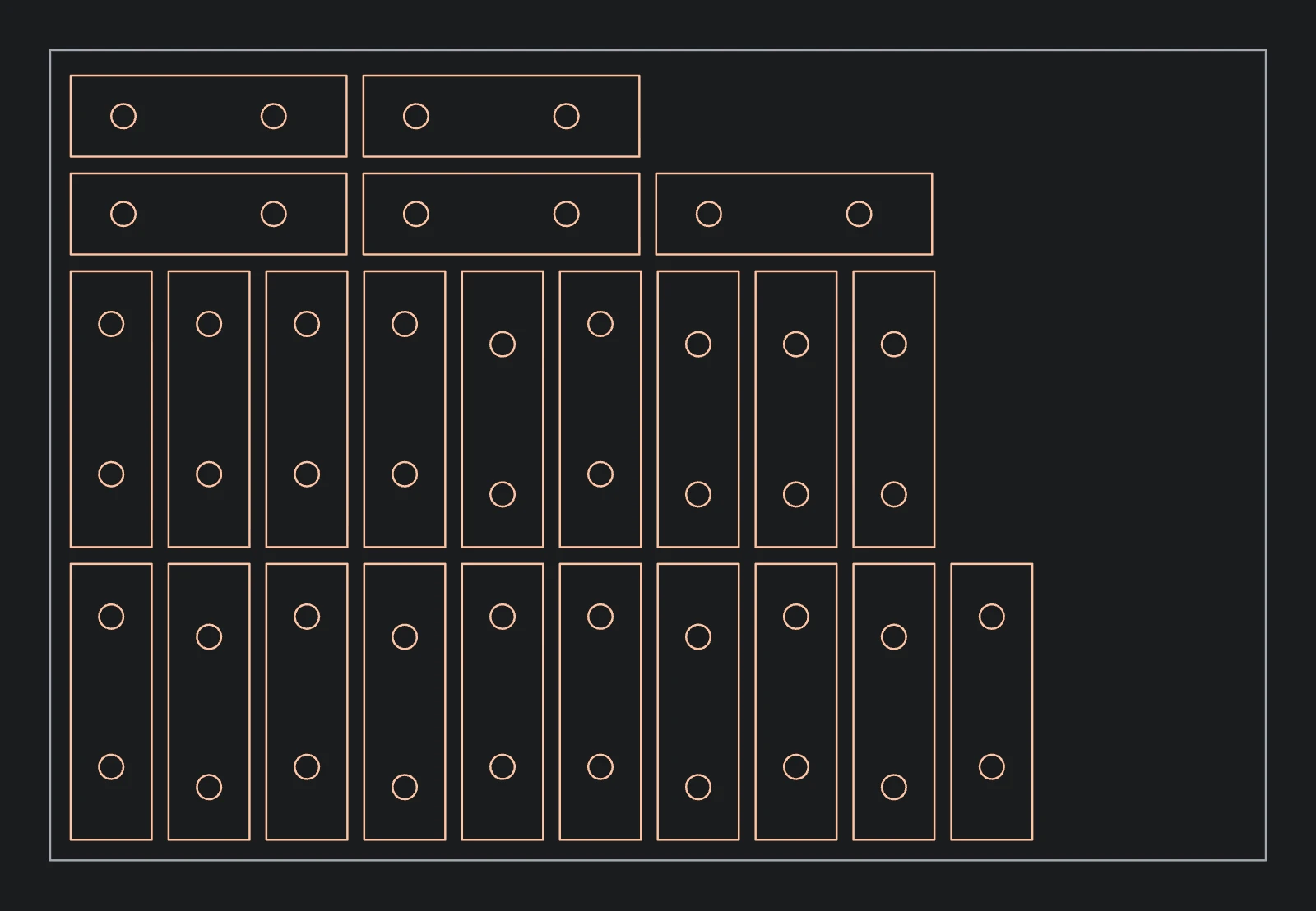
One script takes a bent bracket from five numbers to a cut file a laser can run: a CAD Cloud pipeline models the part, the sheet-metal unfold flattens it, and the nesting places 24 copies on one sheet. You get the bracket as STEP and the sheet as DXF and SVG.
What you need
- A CAD Cloud plan and its API key, from Studio.
- Node.js 22.18 or newer, which runs TypeScript as it is.
- An empty folder with the SDK in it:
npm init -y
npm pkg set type=module
npm install @bitbybit-dev/cad-cloud-sdk
export BITBYBIT_API_KEY=<your key>
The script
Save it as bracket-to-cut-file.ts and run node bracket-to-cut-file.ts.
import { writeFileSync } from "node:fs";
import { BitbybitClient, unwrap } from "@bitbybit-dev/cad-cloud-sdk";

const apiKey = process.env["BITBYBIT_API_KEY"];
if (!apiKey) throw new Error("Set BITBYBIT_API_KEY to your CAD Cloud API key");
const baseUrl = process.env["BITBYBIT_API_URL"];
const client = new BitbybitClient(baseUrl ? { apiKey, baseUrl } : { apiKey });

const bracket = { legA: 40, legB: 30, width: 20, thickness: 2, bendRadius: 4, holeRadius: 3 };
const holeInLegA = [(bracket.legA - bracket.bendRadius) / 2, 0, 0];
const holeInLegB = [bracket.legA, (bracket.legB + bracket.bendRadius) / 2, 0];

const model = await client.cad.pipelineAndPoll({
    steps: [
        { operation: "occt.shapes.wire.createPolylineWire", params: { points: [[0, 0, 0], [bracket.legA, 0, 0], [bracket.legA, bracket.legB, 0]] } },
        { operation: "occt.fillets.fillet2d", params: { shape: "$ref:0", radius: bracket.bendRadius } },
        { operation: "occt.shapes.wire.createRectangleWire", params: { width: bracket.thickness, length: bracket.width, center: [0, 0, 0], direction: [1, 0, 0] } },
        { operation: "occt.operations.pipe", params: { shape: "$ref:1", shapes: ["$ref:2"] } },
        { operation: "occt.shapes.solid.createCylinder", params: { radius: bracket.holeRadius, height: 10, center: holeInLegA, direction: [0, 1, 0], originOnCenter: true } },
        { operation: "occt.shapes.solid.createCylinder", params: { radius: bracket.holeRadius, height: 10, center: holeInLegB, direction: [1, 0, 0], originOnCenter: true } },
        { operation: "occt.booleans.difference", params: { shape: "$ref:3", shapes: ["$ref:4", "$ref:5"], keepEdges: false } },
    ],
    outputs: { formats: ["step"] },
});
const step = model.downloads.find((download) => download.format === "step");
if (step === undefined) throw new Error("The pipeline returned no STEP file");
const stepBytes = Buffer.from(await (await fetch(step.downloadUrl)).arrayBuffer());
writeFileSync("bracket.step", stepBytes);
console.log("saved bracket.step");

const file = await client.files.uploadBytes("bracket.step", stepBytes, "application/octet-stream");
const { taskId } = await unwrap<{ taskId: string }>(await client.request("POST", "/api/v1/cad/pro/unfold/solid-and-nest", {
    stepFileId: file.fileId,
    kFactor: 0.44,
    nesting: { quantity: 24, sheets: [{ width: 300, height: 200 }], spacing: 4, margin: 5, seed: 1, evaluationBudget: 20000 },
    outputs: { formats: ["dxf", "svg"] },
}));
const { downloads } = await client.tasks.pollAndDownload(taskId, { intervalMs: 2000, maxAttempts: 600 });
for (const download of downloads) {
    writeFileSync(download.filename, Buffer.from(await (await fetch(download.downloadUrl)).arrayBuffer()));
    console.log(`saved ${download.filename}`);
}
It prints each file as it saves it: bracket.step, then result.dxf, result.svg and result-metadata.json.
How it works
1. The pipeline models the bracket
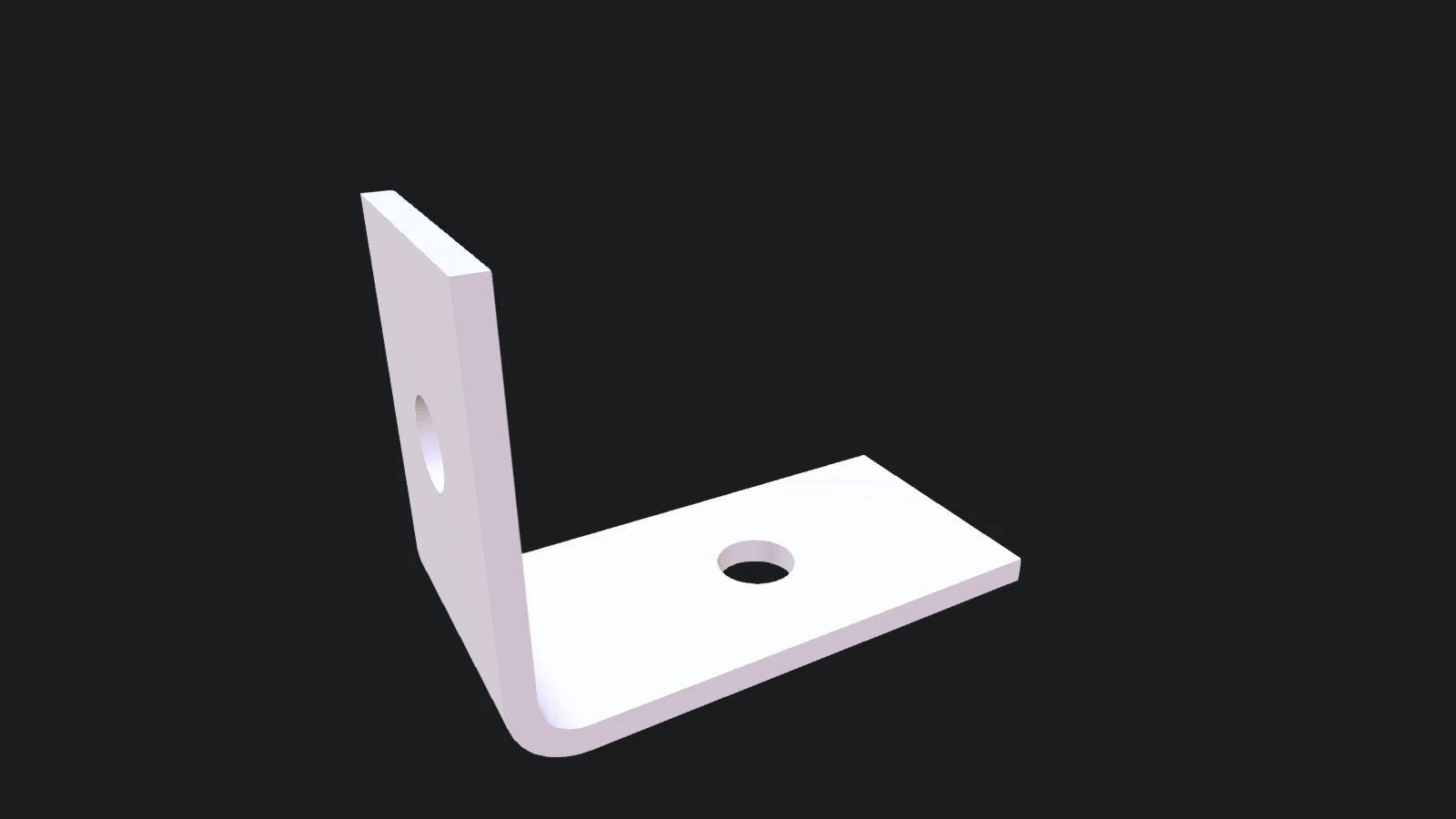
A bent bracket is a profile swept along a path. The path is a polyline with the two legs, legA and legB, and its
corner is rounded to the bend radius by occt.fillets.fillet2d. The profile is a rectangle as thick as the sheet and
as wide as the bracket, and occt.operations.pipe sweeps it along the path into one solid with a rounded bend. Two
cylinders, each through the middle of a leg, are cut away by occt.booleans.difference, which leaves a hole in each
leg.
Every step names the earlier result it works on as $ref:N, counting from 0. The pipeline returns its last result,
the bracket, in the formats asked for, here step; the script saves it as bracket.step.
Change a number in bracket and run the script again: a longer leg, a wider bracket or a larger hole gives a new
part and a new cut file. Keep the hole inside its leg and away from the bend.
2. Unfold and nest it
The script uploads bracket.step and sends it to /api/v1/cad/pro/unfold/solid-and-nest, which unfolds every solid
in the file and nests the flat patterns in the same call:
kFactor: 0.44places the neutral axis in the bend, and with it the length of the flat;nesting.quantity: 24places 24 copies, on a 300 x 200 mm sheet, 4 mm apart and 5 mm from its edges;seedandevaluationBudgetmake the search stop after the same number of tries, so the layout is the same every time you run it.
The Pro routes are called with client.request, the SDK's call for any route, and unwrap hands back the answer's
data or throws its error.
3. What comes back
result.dxf: an AutoCAD 2000 drawing in millimetres, the sheet's outline on layerSHEETSand the 24 cut paths on layerPARTS, the holes as true circles.result.svg: the same drawing as an SVG file, red cut paths on a grey sheet outline; the picture at the top of this page draws it light on dark.result-metadata.json: the nesting report. Each flat has three loops, its outline and two holes, so the 24 copies need 72 pierces, and every one was placed on the one sheet.
Next
- Every option of the call is on the Sheet-metal unfold page.
- A batch of variants in one pipeline models several sizes at once and nests them together.
- Pipelines lists what a pipeline can do.