Pipelines
Pipelines let you chain multiple CAD operations in a single request. Each step can reference the output of any previous step, allowing you to build complex geometry through composition.
Studio Pipeline Builder
You don't need to write pipeline JSON by hand. The Bitbybit Studio includes a visual pipeline builder where you can add operations, configure parameters with form controls, and wire step references using dropdowns. The generated JSON is shown in a live preview panel - you can copy it for use with the SDK or REST API.
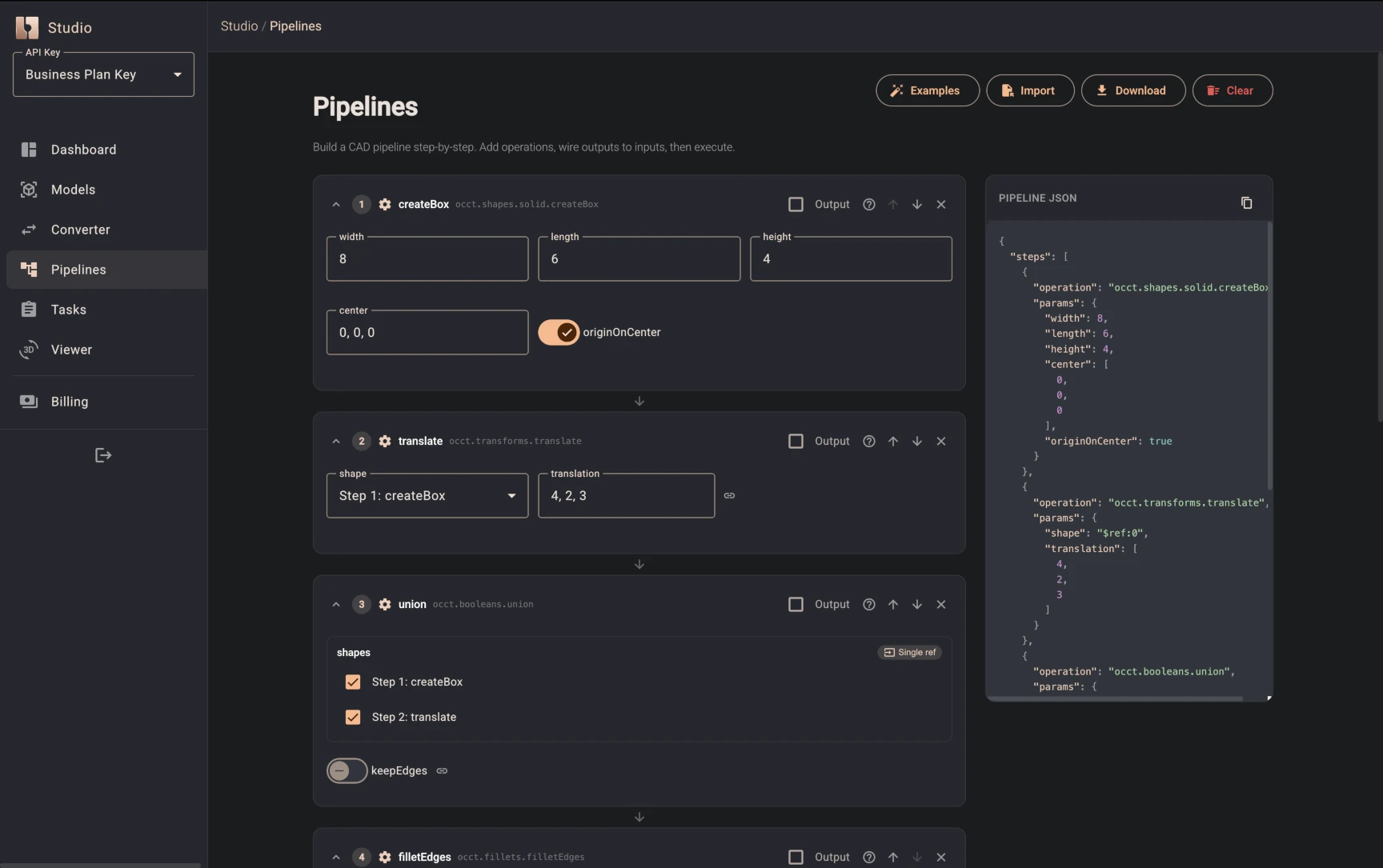
Running a pipeline counts toward your plan's compute minutes - whether you trigger it from the SDK, REST API, or Studio. The time billed is the server-side execution time of the pipeline.
Linear Pipelines
The simplest pipeline is a flat array of steps executed sequentially. Use $ref:N (zero-based index) to pass one step's result to another:
const { downloads } = await client.cad.pipelineAndPoll({
    steps: [
        {
            operation: "occt.shapes.solid.createBox",
            params: { width: 10, length: 10, height: 10, center: [0, 0, 0] },
        },
        {
            operation: "occt.shapes.solid.createSphere",
            params: { radius: 6, center: [0, 0, 0] },
        },
        {
            operation: "occt.booleans.difference",
            params: {
                shape: "$ref:0",      // box from step 0
                shapes: ["$ref:1"],   // sphere from step 1
                keepEdges: false,
            },
        },
    ],
    outputs: { formats: ["gltf"] },
});
Any step can reference any earlier step - not just the immediately preceding one. This gives you DAG-like data flow within a sequential execution model.
All Reference Types
| Reference | Resolves to |
|---|---|
$ref:N | Entry N in the global results array (zero-based). Map inner steps also push results to this array - see the Map section for index counting. |
$file:N | Input file N as UTF-8 text |
$file:N:format | Input file N in a specific format (json, buffer, uint8, base64) |
$prev | Result of the previous step in the current scope |
$local:N | Result of step N in the current scope (useful inside map/choice) |
$item | Current element inside a map iteration |
$index | Current iteration index (0-based) inside a map |
$mapResult | Collected iteration results inside a map's reduce sub-steps |
References are resolved recursively - they work inside objects, arrays, and nested structures anywhere in params.
File Inputs
Pipelines can consume uploaded files via $file:N references. Upload files first using client.files.upload(), then reference them by ID:
const { downloads } = await client.cad.pipelineAndPoll({
    steps: [
        // Import STEP file as an OCCT shape
        { operation: "occt.io.loadSTEPorIGES", params: { filetext: "$file:0", fileName: "model.step" } },
        // Fillet all edges
        { operation: "occt.fillets.filletEdges", params: { shape: "$ref:0", radius: 2 } },
    ],
    inputFiles: [
        { fileId: "file_abc123", role: "step-model" },
    ],
    outputs: { formats: ["gltf", "step"] },
});
File Read Formats
By default, $file:N reads the file as a UTF-8 string. You can append a format suffix to control how the file content is delivered to the operation:
| Reference | Returns | Use case |
|---|---|---|
$file:0 | UTF-8 string | STEP, IGES, CSV, plain text |
$file:0:json | Parsed JavaScript object | JSON configuration files, coordinate arrays |
$file:0:buffer | ArrayBuffer | Binary file data |
$file:0:uint8 | Uint8Array | Binary file data |
$file:0:base64 | Base64-encoded string | Encoded binary transfer |
The format is determined by the suffix on the reference, not by the file's content type. A file uploaded as application/octet-stream can be read as :json if it contains valid JSON.
CSV data as input
const { downloads } = await client.cad.pipelineAndPoll({
    steps: [
        // Parse CSV into JSON array
        { operation: "csv.parseToJson", params: { csv: "$file:0" } },
        // Query x-coordinates
        { operation: "json.query", params: { json: "$ref:0", query: "$..x" } },
    ],
    inputFiles: [
        { fileId: "file_xyz789", role: "coordinates" },
    ],
});
JSON data as input
Use the :json format to skip a json.parse step:
const { downloads } = await client.cad.pipelineAndPoll({
    steps: [
        // $file:0:json parses the JSON file directly - no json.parse step needed
        // Assume the file contains: { "width": 10, "length": 20, "height": 5 }
        { operation: "occt.shapes.solid.createBox", params: "$file:0:json" },
    ],
    inputFiles: [
        { fileId: "file_config123", role: "box-dimensions" },
    ],
    outputs: { formats: ["gltf"] },
});
$item resolves to the entire element - there is no dot-path property access like $item.x. If you need to extract a nested property from each item, use a json.query step inside the map.
Limits
- Max 5 input files per pipeline
- Files must belong to the same API key
Map (Iteration)
Map iterates over an array and runs sub-steps for each item. The result is an array of outputs - one per iteration.
Map inner steps push their results into the global results array. This means $ref:N indices are offset by the number of inner step executions. For example, if a map runs 6 iterations with 1 inner step each, that consumes 6 indices before the map result itself.
Counting rule: After a map step that runs I iterations with S inner steps each, the map result array is at index start + (I × S), where start is the next available index when the map begins.
const { downloads } = await client.cad.pipelineAndPoll({
    steps: [
        // Index 0: Create base plate
        {
            operation: "occt.shapes.solid.createBox",
            params: { width: 25, length: 25, height: 1, center: [0, 0, 0] },
        },
        // Index 1: Create a cylinder to pattern
        {
            operation: "occt.shapes.solid.createCylinder",
            params: { radius: 1, height: 5, center: [0, 0, 0] },
        },
        // Index 2: Define positions (6 items)
        {
            operation: "json.parse",
            params: { text: "[[5,0,0],[10,0,0],[-5,0,0],[-10,0,0],[0,0,5],[0,0,-5]]" },
        },
        // Map begins at index 3. Inner steps run 6 times (1 step × 6 items).
        // Inner results land at indices 3..8. Map result array is at index 9.
        {
            type: "map",
            items: "$ref:2",
            steps: [
                { operation: "occt.transforms.translate", params: { shape: "$ref:1", translation: "$item" } },
            ],
        },
        // Index 10: Union all translated cylinders ($ref:9 = map result array)
        {
            operation: "occt.booleans.union",
            params: { shapes: "$ref:9" },
        },
        // Index 11: Union cylinder group with the base plate
        {
            operation: "occt.booleans.union",
            params: { shapes: ["$ref:0", "$ref:10"] },
        },
    ],
    outputs: { formats: ["gltf"] },
});
Inside a map:
$item- the current element from theitemsarray$index- the current iteration index (0-based)$ref:N- still references top-level step results$prev- the result of the previous step within the current scope$local:N- the result of step N within the current scope (0-based, scope-local)
Map with Reduce
Map supports an optional reduce field - a sub-pipeline that runs after all iterations and receives $mapResult (the collected array):
const { downloads } = await client.cad.pipelineAndPoll({
    steps: [
        // Step 0: Base plate
        { operation: "occt.shapes.solid.createBox", params: { width: 20, length: 20, height: 2, center: [0, 0, 0] } },
        // Step 1: Cylinder to pattern
        { operation: "occt.shapes.solid.createCylinder", params: { radius: 1, height: 5, center: [0, 0, 0] } },
        // Step 2: Positions
        { operation: "json.parse", params: { text: "[[5,0,0],[10,0,0],[-5,0,0],[-10,0,0]]" } },
        // Step 3: Map + reduce into single union
        {
            type: "map",
            items: "$ref:2",
            steps: [
                { operation: "occt.transforms.translate", params: { shape: "$ref:1", translation: "$item" } },
            ],
            reduce: [
                { operation: "occt.booleans.union", params: { shapes: "$mapResult" } },
                { operation: "occt.booleans.union", params: { shapes: ["$ref:0", "$prev"] } },
            ],
        },
    ],
    outputs: { formats: ["gltf"] },
});
Without reduce, the map result is the collected array. With reduce, the map result is the output of the reduce sub-pipeline's last step.
The reduce and $mapResult features are validated and the reference resolution is unit-tested, but there are no end-to-end integration tests for reduce execution yet. The pattern above is the intended usage.
Map with Multiple Inner Steps
Use $prev and $local:N to chain operations within each iteration:
const result = await client.cad.pipelineAndPoll({
    steps: [
        // Step 0: generate items
        { operation: "json.parse", params: { text: "[1, 5, 10]" } },
        // Step 1: map with two inner steps
        {
            type: "map",
            items: "$ref:0",
            steps: [
                // inner step 0: double the item
                { operation: "math.twoNrOperation", params: { first: "$item", second: 2, operation: "multiply" } },
                // inner step 1: add 100 to the previous result
                { operation: "math.twoNrOperation", params: { first: "$prev", second: 100, operation: "add" } },
            ],
        },
    ],
});
// Step 1 result: [102, 110, 120]
Limits
- Max 100 items per map
- Max 3 nesting levels (map inside map)
- Total operations across all steps and iterations: 500
Choice (Conditional)
Choice evaluates a condition and runs one of two branches:
// - "gt" with then branch: 10 > 5 → then executes
// - "gt" with else branch: 3 > 5 → else executes
// - "eq" operator: 42 == 42 → then executes
{
    type: "choice",
    value: "$ref:2",
    operator: "gt",
    compareTo: 100,
    then: [
        { operation: "math.twoNrOperation", params: { first: "$ref:2", second: 2, operation: "multiply" } },
    ],
    else: [
        { operation: "math.twoNrOperation", params: { first: "$ref:2", second: 3, operation: "multiply" } },
    ],
}
To compare a nested property, extract it with a preceding json.query step and reference that step in value.
Supported operators: eq, neq, gt, gte, lt, lte, exists.
The result of a Choice step is the result of whichever branch executed.
JSONPath Queries
Use json.query steps to extract specific values from intermediate results using JSONPath Plus expressions:
// Extract all x-coordinates from an array of point objects
{ operation: "json.query", params: { json: "$ref:2", query: "$..x" } }

// Get items where price < 10
{ operation: "json.query", params: { json: "$ref:3", query: "$.[?(@.price<10)]" } }

// Get the first element
{ operation: "json.query", params: { json: "$ref:1", query: "$..[0]" } }
OCCT shapes are opaque in-memory objects - they don't have JSON properties. To get a volume, call occt.shapes.solid.getSolidVolume as a separate step. JSONPath queries work on data structures (JSON, arrays, parsed CSV), not geometry.
Constructing Data
Use json.* operations to build objects dynamically within a pipeline:
[
    { operation: "json.createEmpty", params: {} },
    { operation: "json.setValueOnProp", params: { json: "$ref:0", property: "center", value: [5, 0, 0] } },
    { operation: "json.setValueOnProp", params: { json: "$ref:1", property: "radius", value: 3 } },
    // $ref:2 is now { "center": [5, 0, 0], "radius": 3 }
]
Combined with Map and $item/$index, this allows dynamic parameter construction per iteration.
Marking Steps as Output
By default, pipelines produce a single result based on the last step - either a shape file (GLTF/STEP/STL) or a data file (JSON/CSV). But sometimes you want both: a shape file plus structured data (measurements, metadata, coordinates).
Add output: true to any step to include its result in a separate result.json download alongside the shape outputs:
const { downloads } = await client.cad.pipelineAndPoll({
    steps: [
        // Step 0: Create a box
        { operation: "occt.shapes.solid.createBox", params: { width: 10, length: 8, height: 5, center: [0, 0, 0] } },
        // Step 1: Measure volume
        { operation: "occt.shapes.solid.getSolidVolume", params: { shape: "$ref:0" } },
        // Step 2: Measure surface area
        { operation: "occt.shapes.solid.getSolidSurfaceArea", params: { shape: "$ref:0" } },
        // Step 3: Build JSON with measurements
        { operation: "json.createEmpty", params: {} },
        { operation: "json.setValueOnProp", params: { json: "$ref:3", property: "volume", value: "$ref:1" } },
        // Step 5: Mark this step's result for output
        {
            operation: "json.setValueOnProp",
            params: { json: "$ref:4", property: "surfaceArea", value: "$ref:2" },
            output: true,
        },
        // Step 6: Fillet the box - this is the last step, so it determines the shape output
        { operation: "occt.fillets.filletEdges", params: { shape: "$ref:0", radius: 1 } },
    ],
    outputs: { formats: ["gltf", "step"] },
});
// downloads contains:
//   - pipeline.glb (filleted box)
//   - pipeline.step (filleted box)
//   - result.json ({"volume": 400, "surfaceArea": 340})
Multiple steps can have output: true - all their results are collected into a single result.json array.
This is useful for parametric workflows where you need to return computed dimensions, BOM data, or validation results alongside the CAD geometry.
Output Formats
Pipelines support multiple output formats depending on the kernel used and the type of result:
| Format | MIME Type | When to Use |
|---|---|---|
gltf | model/gltf-binary | OCCT shapes → web-ready 3D (GLB) |
step | application/step | OCCT shapes → CAD exchange format |
stpz | application/gzip | OCCT shapes → compressed STEP |
stl | model/stl | Manifold/JSCAD meshes → 3D printing |
3mf | model/3mf | JSCAD meshes → 3D printing with color |
decomposed-mesh | application/json | OCCT shapes → raw mesh data (vertices, faces) |
json | application/json | Any data result → downloadable JSON file |
csv | text/csv | Tabular data → downloadable CSV file |
Returning data (JSON / CSV)
If your pipeline computes measurements, coordinates, or metadata, you can export the result as a downloadable file:
const { downloads } = await client.cad.pipelineAndPoll({
    steps: [
        { operation: "occt.shapes.solid.createBox", params: { width: 10, length: 10, height: 10, center: [0, 0, 0] } },
        { operation: "occt.shapes.solid.getSolidVolume", params: { shape: "$ref:0" } },
        { operation: "json.createEmpty", params: {} },
        { operation: "json.setValueOnProp", params: { json: "$ref:2", property: "volume", value: "$ref:1" } },
    ],
    outputs: { formats: ["json"] },
});
// downloads contains pipeline.json with { "volume": 1000 }
Manifold / JSCAD outputs
For meshes created with the manifold.* or jscad.* operations, use stl (or 3mf for JSCAD):
// Manifold → STL only
const { downloads } = await client.cad.pipelineAndPoll({
    steps: [
        { operation: "manifold.manifold.shapes.sphere", params: { radius: 5 } },
        { operation: "manifold.manifold.shapes.cube", params: { size: 4 } },
        { operation: "manifold.manifold.booleans.subtract", params: { manifold1: "$ref:0", manifold2: "$ref:1" } },
    ],
    outputs: { formats: ["stl"] },
});
STL works with both Manifold and JSCAD results. 3MF is JSCAD-only. For OCCT shapes, use gltf or step.
Available Operations
Pipelines can use any operation under the following root namespaces:
| Namespace | Category | Examples |
|---|---|---|
occt | CAD geometry (OpenCascade) | occt.shapes.solid.createBox, occt.booleans.union, occt.io.loadSTEPorIGES |
jscad | Mesh geometry (JSCAD) | jscad.booleans.subtract |
manifold | Mesh geometry (Manifold) | manifold.manifold.shapes.sphere, manifold.manifold.booleans.subtract |
json | JSON manipulation | json.parse, json.stringify, json.query (JSONPath), json.createEmpty, json.setValueOnProp |
csv | CSV parsing | csv.parseToJson, csv.parseToArray |
lists | Array utilities | lists.getItem, lists.concatenate, lists.getSubList, lists.reverse, lists.repeat |
math | Arithmetic | math.add, math.subtract, math.multiply, math.twoNrOperation, math.remap |
logic | Boolean logic | logic.compare, logic.valueGate, logic.not |
text | String manipulation | text.split, text.join, text.replaceAll, text.format |
vector | Vector math | vector.vectorXYZ, vector.span |
point | Point operations | point.pointXYZ, point.distance |
color | Color utilities | color.hexColor, color.hexToRgb |
line | Line operations | line.create, line.length |
polyline | Polyline operations | polyline.create, polyline.length |
Operation paths must be 2–5 segments deep (e.g. occt.shapes.solid.createBox).
Geometric transforms (translate, rotate, scale, mirror) live under their respective kernel namespaces: occt.transforms.*, manifold.manifold.transforms.*, manifold.crossSection.transforms.*. There is no standalone transforms namespace.
Typed Pipeline Builder
The SDK exports a step() helper that provides full autocomplete for operation paths and their parameters:
import { step } from "@bitbybit-dev/cad-cloud-sdk";

const { downloads } = await client.cad.pipelineAndPoll({
    steps: [
        step("occt.shapes.solid.createBox", { width: 10, length: 10, height: 10, center: [0, 0, 0] }),
        step("occt.fillets.filletEdges", { shape: "$ref:0", radius: 1 }),
        step("occt.shapes.solid.getSolidVolume", { shape: "$ref:1" }, { output: true }),
    ],
    outputs: { formats: ["gltf", "step"] },
});
The step() function narrows the params type based on the operation path - your editor will show available parameters, their types, and JSDoc descriptions.
Available exports
import {
    step,                   // Factory function for typed steps
    type OperationPath,     // Union of all 835 operation paths
    type OperationParams,   // Maps each path to its typed params
    type TypedStep,         // A single typed step
    type TypedMapStep,      // A map step with typed inner steps
    type TypedChoiceStep,   // A choice step with typed branches
    type TypedPipelineBody, // Full pipeline body (steps + inputFiles + outputs)
} from "@bitbybit-dev/cad-cloud-sdk";
You can also import from the dedicated subpath:
import { step } from "@bitbybit-dev/cad-cloud-sdk/pipeline";
Mixing typed and untyped steps
pipelineAndPoll() accepts both PipelineBody (plain objects) and TypedPipelineBody. You can mix step() calls with plain step objects in the same array:
const { downloads } = await client.cad.pipelineAndPoll({
    steps: [
        step("occt.shapes.solid.createSphere", { radius: 5, center: [0, 0, 0] }),
        { operation: "occt.shapes.solid.getSolidVolume", params: { shape: "$ref:0" } },
    ],
    outputs: { formats: ["json"] },
});
Resource Budgets
| Limit | Value |
|---|---|
| Max top-level steps | 50 |
| Max total operations (including map iterations) | 500 |
| Max items per map | 100 |
| Max nesting depth | 3 |
| Max input files | 5 |
| Max pipeline payload | 512 KB |
| Max params depth | 10 levels |
| Max params keys | 500 |
| Max string param length | 1,000,000 chars |
| Max array param length | 10,000 elements |
Most API endpoints have a 128 KB body limit, but pipelines allow up to 512 KB. If the pipeline body exceeds the queue message size, it overflows to server-side storage and can reach up to 3 MB. The effective limit is also bounded by your plan tier's per-key threshold.
Error Handling
Pipelines use fail-fast semantics. If any step fails (including within a map iteration), the entire pipeline fails immediately with the error from the failing step. There is no partial-result collection.
Backward Compatibility
All existing pipeline requests continue to work unchanged:
- Steps without a
typefield are treated as plain operation steps $ref:Nresolution is unchanged- The 50-step limit still applies to top-level steps
- New features (Map, Choice,
$file:N, reduce, new output formats) are all opt-in